Business Central Cloud Migration: be careful on reusing the same self-hosted runtime.
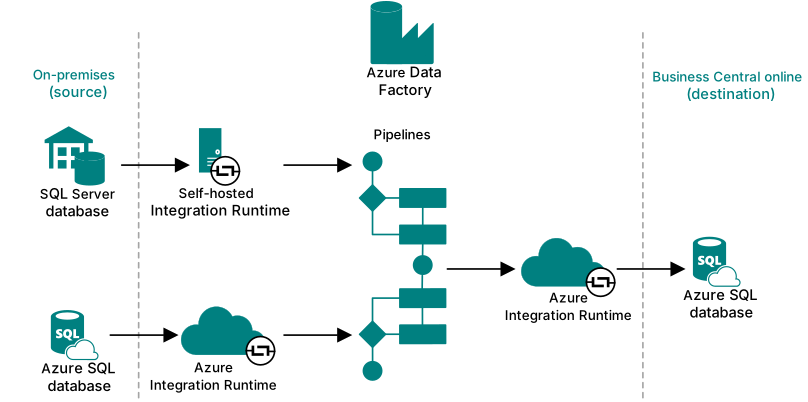
Cloud migration in Dynamics 365 Business Central uses integration runtime to replicate data from on-premises SQL Server or Azure SQL to the cloud. Do not reuse the same self-hosted integration runtime across different migrations, as it becomes disabled after migration completion or 10 days of inactivity, causing setup errors.
 post Stefano Demiliani
"When one environment completes the cloud migration process, it disables the cloud side of the integration runtime, making it unusable for the other environments."
Key points
- Cloud migration requires self-hosted integration runtime for SQL Server databases and Azure Integration Runtime for Azure SQL databases
- The self-hosted runtime must be installed locally, registered in Azure Data Factory, and securely copies data to cloud pipelines
- Reusing the same integration runtime across different migrations causes the error ‘tenant has not been set up with a valid integration environment’
- Integration runtime becomes disabled after migration completion or when inactive for more than 10 days
- Each cloud migration should use its own dedicated integration runtime to avoid conflicts
Quotes
- “When one environment completes the cloud migration process, it disables the cloud side of the integration runtime, making it unusable for the other environments.” (Explains the core issue that causes failures when sharing integration runtimes between migrations)
- “To prevent this, you should not share integration runtimes between environments.” (Provides the critical best practice recommendation to avoid migration failures)
Context
- Features: Cloud Migration, Self-Hosted Integration Runtime, Azure Integration Runtime, Data Replication Pipeline
Source: Stefano Demiliani, community blog. Summary, key points and quotes are derived (CONTENT-NOTICE.md); read the original for the full text.