⦻ GitIgnore Visual: Visual Indicators for Ignored Files in VS Code ✨
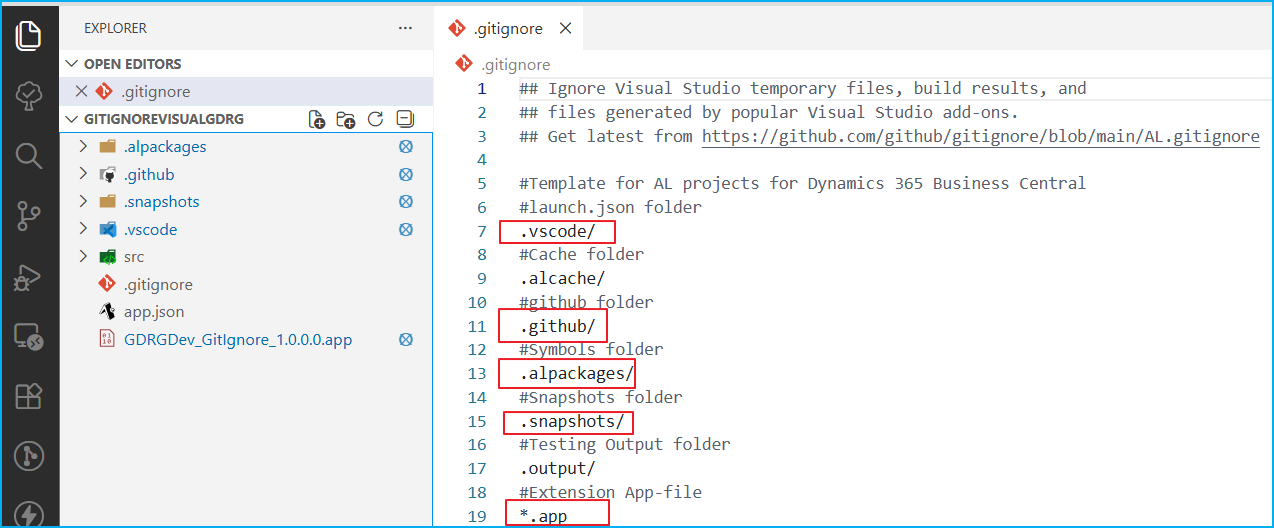
GitIgnore Visual is a VS Code extension that adds visual badge indicators (⦻) next to files and folders ignored by .gitignore rules, with hover details showing the specific rule and file path. It helps developers working with Business Central AL extensions, Node.js, or .NET projects quickly identify which files are excluded from version control.
 post Gerardo Rentería Blog
"GitIgnore Visual displays a distinctive badge (⦻) next to each file or folder that matches a rule in the .gitignore file."
Key points
- VS Code extension displays a distinctive ⦻ badge next to each file or folder matching .gitignore rules
- Hovering over ignored items shows the specific rule causing exclusion and the full path to .gitignore file
- Works with Business Central AL extensions (.alpackages/, .snapshots/) and other project types like Node.js and .NET
- Automatically activates when a .gitignore file exists in workspace root; can be manually refreshed via command palette
Quotes
- “GitIgnore Visual displays a distinctive badge (⦻) next to each file or folder that matches a rule in the .gitignore file.” (It explains the core functionality of providing immediate visual feedback for ignored files directly in the VS Code explorer.)
- “Hovering over any ignored item will display a description: The specific .gitignore rule causing the exclusion. The full path to the .gitignore file.” (It clarifies what information developers get when they interact with the visual indicator, helping them understand why files are ignored.)
Context
- Features: visual indicators for ignored files, hover tooltips with exclusion rules, customizable badge icon, automatic activation, manual refresh command
Source: Gerardo Renteria, community blog. Summary, key points and quotes are derived (CONTENT-NOTICE.md); read the original for the full text.