Why do all my tests show up twice in the test explorer?
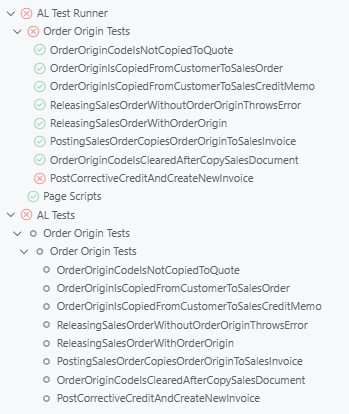
Tests show up twice in the VS Code test explorer when the pre-release AL Language extension, which now finds tests itself, is installed alongside AL Test Runner. The author suggests going back to the release AL Language version for now. He suspects a bug: test runs hang against containers older than BC28, which leaves Copilot waiting for results.
 post James Pearson
Key points
- The pre-release AL Language extension adds its own AL Tests tree to the test explorer, which duplicates the AL Test Runner entries
- With BC28 the AL Language extension can connect to the server to run tests; earlier versions lack this execution support
- An All Tests run against a pre-BC28 container never finishes, so an AI model running tests waits forever; the author filed a GitHub issue
- AL Test Runner still offers extra features such as code coverage, downloading performance profiles and running page scripts
- The author will keep maintaining AL Test Runner until Microsoft’s tooling is rich enough to replace it
Context
- Features: test discovery, test execution, test explorer, code coverage, performance profiling, page scripts, copilot integration
- Versions: BC28
Source: James Pearson, community blog. Summary, key points and quotes are derived (CONTENT-NOTICE.md); read the original for the full text.