BC Friday Tips #74 Copy Document and Custom Field
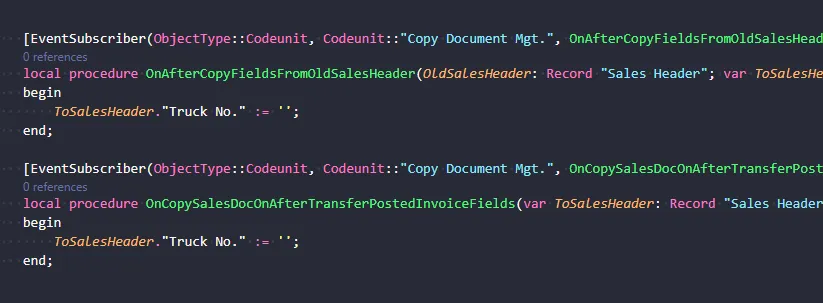
When adding custom fields to Sales Header or Sales Invoice Header tables, developers must consider how the Copy Document feature will handle those fields. The post explains that custom fields are automatically copied along with documents, requiring developers to decide whether values should be copied, cleared, or recalculated to maintain data integrity.
Read it hereOpen in Claudehttps-thatnavguy-com-blog-2026-bc-friday-tips-74-copy-document--70de705561.md
 post That NAV Guy
"If users use Copy Document, your custom field will be copied too."
Key points
- Custom fields added to Sales tables are automatically included when users copy documents
- Developers must determine for each field whether its value should be copied, cleared, or recalculated
- Improper Copy Document behavior can introduce invalid data and cause process issues
- Field design decisions at creation time prevent problems during document operations
Quotes
- “If users use Copy Document, your custom field will be copied too.” (This explains that custom fields are not exempt from Copy Document behavior, making developers responsible for controlling this behavior)
- “A small design decision now can prevent a lot of problems later.” (This emphasizes the importance of planning Copy Document behavior upfront rather than fixing it reactively)
AL objects mentioned
As named in the post. A name that matches one object page by exact type and name links to it; the others stay as named.
Context
- Features: Copy Document, Custom Fields
Source: That NAV Guy, community blog. Summary, key points and quotes are derived (CONTENT-NOTICE.md); read the original for the full text.