Dynamics 365 Business Central: How to check whether the current page/report is standard or customized
This post explains how to determine whether a Business Central page or report is standard or customized using object ID ranges, page inspection, and performance profiler tools. It helps developers and partners quickly identify whether functionality has been extended or modified.
 post Dynamics 365 Lab
"The extension model is object-based; you create new objects, and extend existing objects depending on what you want your extension to do."
Key points
- Object ID ranges show origin: 0-49,999 is base app, 50,000-99,999 is per-tenant customization, 100,000-999,999 is Microsoft localization, 1,000,000-69,999,999 is RSP and 70,000,000-74,999,999 is AppSource apps
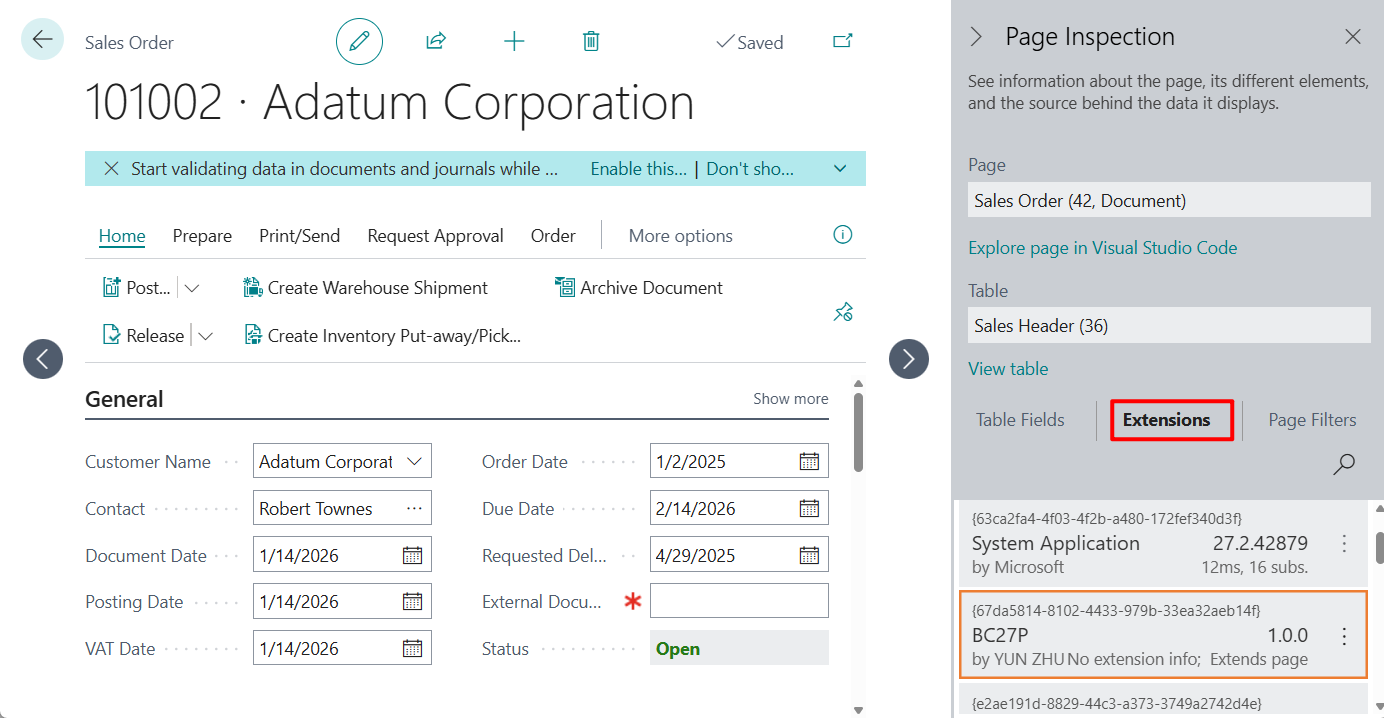
- Page Inspection (Ctrl+Alt+F1) shows page and report IDs, and its Extensions tab lists extensions that add or extend the page or its source table; it does not show extensions for reports
- The AL profiler (VS Code since BC19, in-client since BC20) lists active apps and the call tree, but only detects custom code that actually runs during the recording
- Error details and the AL call stack, also available through View the last known error, show which extension objects were involved
Quotes
- “The extension model is object-based; you create new objects, and extend existing objects depending on what you want your extension to do.” (Explains the fundamental architecture behind identifying whether pages are standard or customized)
AL objects mentioned
As named in the post. A name that matches one object page by exact type and name links to it; the others stay as named.
- codeunit 22 “Item Jnl.-Post Line”
- codeunit 23 “Item Jnl.-Post Batch”
- codeunit 241 “Item Jnl.-Post”
- page 40 “Item Journal”
- codeunit “ExtDocNoHandler”
Not found in BC28-30: codeunit “ExtDocNoHandler”.
Possibly related
No source states these links: they share an object, a model read them, or a person found the same subject.
- BC Friday Tips #35 Item Journal Posting and Warehouse Entries — possibly related: both name Codeunit 23 “Item Jnl.-Post Batch”
- Business Central 2026 release wave 1 (BC28): Post purchase invoices for drop shipments independently of related sales invoices — possibly related: both name Codeunit 22 “Item Jnl.-Post Line”
- Design details - Cost adjustment — possibly related: names Codeunit 22 “Item Jnl.-Post Line”
- Design details - Item tracking posting structure — possibly related: names Codeunit 22 “Item Jnl.-Post Line”
- Dynamics 365 Business Central – Some Considerations when Changing Standard Cost on an Item Card — possibly related: both name Page 40 “Item Journal”
- New Application Ideas of Dynamics 365 Business Central (2025 NOV) — possibly related: both name Codeunit 22 “Item Jnl.-Post Line”
- What’s new: Business Central Mobile App and Barcode Scanning (2024 release wave 1) — possibly related: both name Page 40 “Item Journal”
Heads up
- gotcha: “If a page has been customized but the specific custom logic is not triggered, this method will not detect it”
Context
- Features: Page Inspection, Performance Profiler, In-client Performance Profiler, AL Performance Snapshot Debugger, Error Details View, SessionInformation Data Type
- Versions: BC19, BC20, BC26, BC27
Source: Dynamics 365 Lab - Yun Zhu, community blog. Summary, key points and quotes are derived (CONTENT-NOTICE.md); read the original for the full text.