Dynamics 365 Business Central: To automatically delete archived versions (For example, have 10 versions and want to keep a copy of the latest)
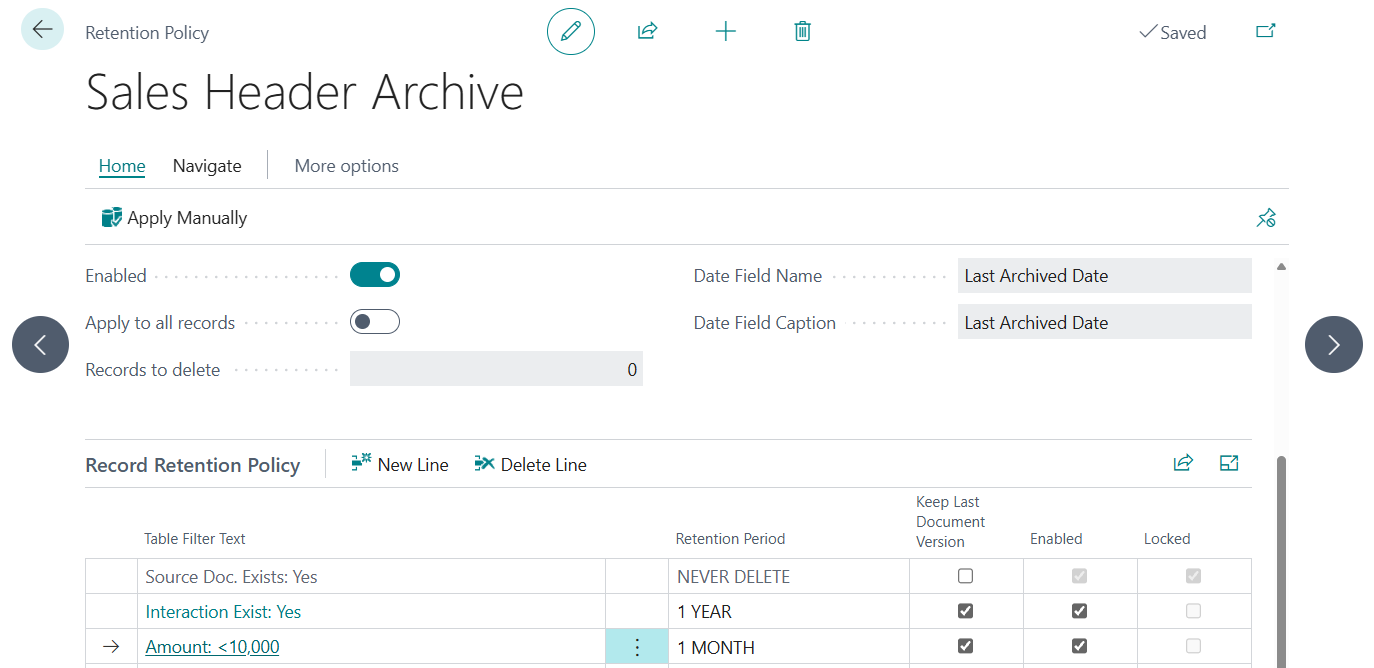
Business Central allows you to automatically delete archived versions of sales, purchase, and service documents using retention policies, while optionally keeping the most recent version. Retention policies help administrators manage data cleanup by deleting archived documents past their expiration date based on the most recent archived version's date.
 post Dynamics 365 Lab
"If the original document isn't deleted, Business Central you can't delete the archived versions."
Key points
- Archive sales, purchase, service, and project documents automatically when documents are changed, deleted, printed, emailed, or posted
- Use retention policies to automatically delete old archived versions while keeping the most recent one
- Original documents must be deleted before their archived versions can expire; archived versions don’t expire if the original still exists
- Specify retention periods and define which archive tables to include in cleanup policies from the setup page
Quotes
- “If the original document isn’t deleted, Business Central you can’t delete the archived versions.” (This is a critical constraint when setting up retention policies; original documents must be removed before archives can expire)
- “When you set up the retention policy, you can specify that you want the policy to delete all archived versions except the most recent.” (This capability directly addresses the user requirement to keep only the latest version while cleaning up historical archives)
- “Retention policies let administrators define how long they want to store data.” (Core feature that enables automated cleanup without manual intervention, reducing storage and maintaining compliance)
AL objects mentioned
As named in the post. A name that matches one object page by exact type and name links to it; the others stay as named.
Possibly related
No source states these links: they share an object, a model read them, or a person found the same subject.
- Troubleshooting the Shopify and Business Central synchronization — possibly related: names Table 5107 “Sales Header Archive”
Heads up
- gotcha: “If the original document isn’t deleted, Business Central you can’t delete the archived versions.” (about table Sales Header Archive)
Context
- Features: Automatic document archiving, Retention policies, Manual archiving, Archive cleanup, Document restoration, Version management
Source: Dynamics 365 Lab - Yun Zhu, community blog. Summary, key points and quotes are derived (CONTENT-NOTICE.md); read the original for the full text.