Dynamics 365 Business Central: Comparing Years (Year-Over-Year) in Analysis Mode: A Simple 4-Step Guide
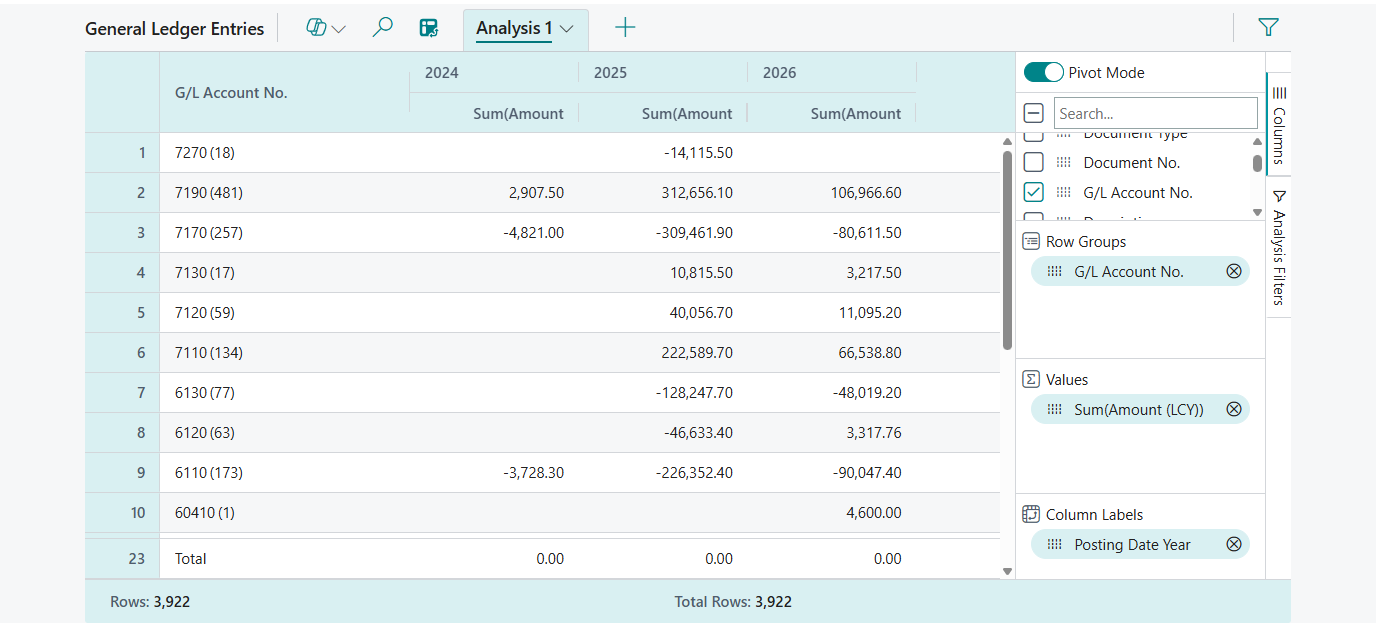
This post explains how to create year-over-year comparison reports in Business Central using Analysis Mode, a feature that enables pivot table creation and data analysis directly on list pages without requiring separate reporting or customization. The post walks through a four-step process using General Ledger Entries as an example and covers feature evolution from BC22 through BC26.
 post Dynamics 365 Lab
"Comparing Years report (Year-Over-Year or YoY Analysis) simply means comparing year-over-year or year-on-year data."
Key points
- Analysis Mode allows users to create pivot tables and analysis views on list pages without customization or separate report running
- Year-over-year analysis compares current year data against same periods in previous years to evaluate metrics over time
- The four-step process involves enabling Pivot Mode, setting display values, dragging the Posting Date Year to column labels, and grouping rows
- Analysis results can be shared via copy link or exported to Excel, and Copilot can assist with creating analysis tabs
Quotes
- “Comparing Years report (Year-Over-Year or YoY Analysis) simply means comparing year-over-year or year-on-year data.” (This clarifies the business purpose of the analysis technique being taught)
AL objects mentioned
As named in the post. A name that matches one object page by exact type and name links to it; the others stay as named.
- other “General Ledger Entries”
Context
- Features: Analysis Mode, Pivot Mode, Year-over-year comparison, Copy Link in Analysis Mode, Copilot-created analysis tabs, Analysis enhancements with Copilot, Related table fields in analysis mode
- Versions: BC22, BC23, BC23.1, BC24, BC25, BC26.2
Source: Dynamics 365 Lab - Yun Zhu, community blog. Summary, key points and quotes are derived (CONTENT-NOTICE.md); read the original for the full text.