Dynamics 365 Business Central: A universal method to check if a Field has a value in AL
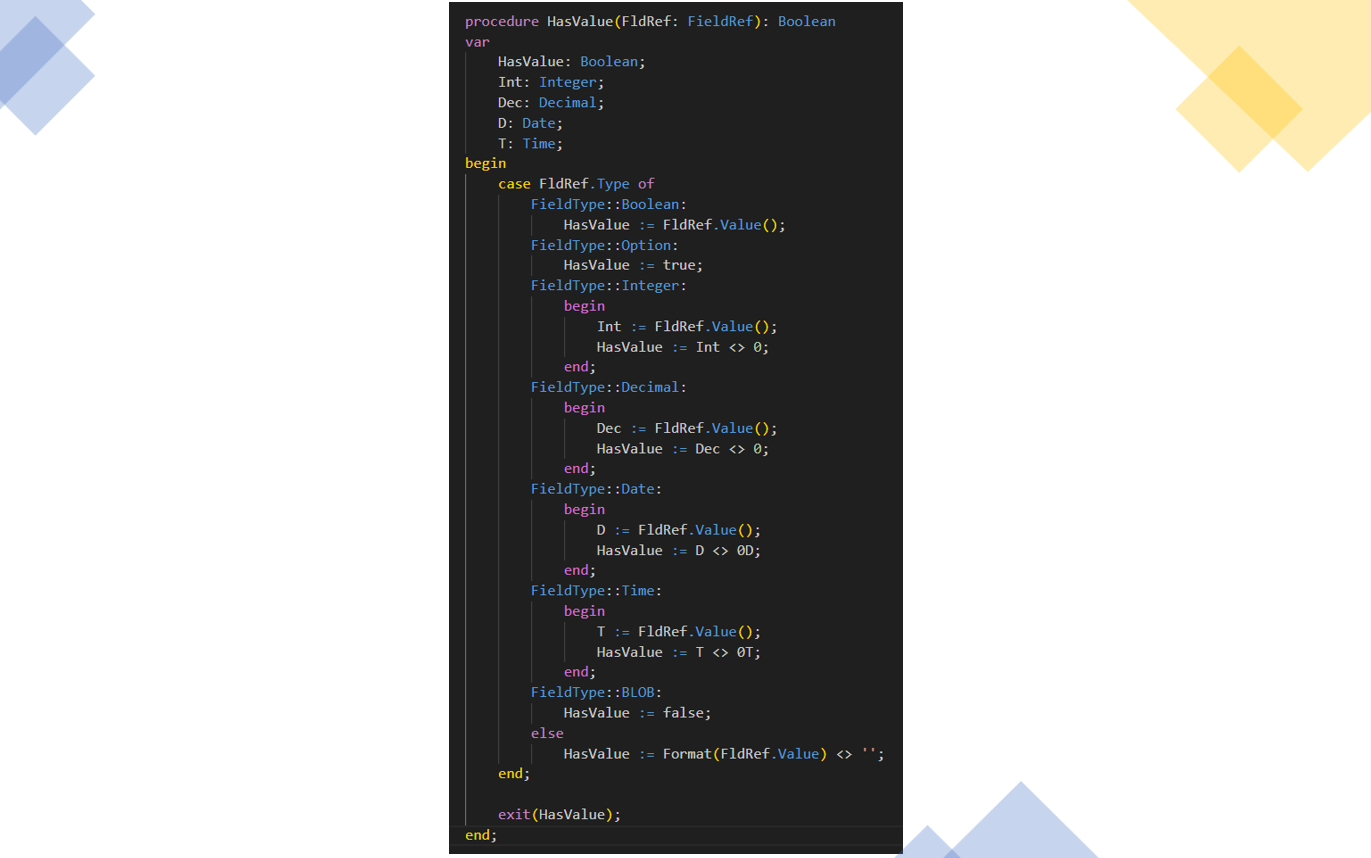
The post explains how to universally check if a field contains a value in Business Central AL code using the HasValue procedure from the Change Log Management codeunit, which works across different data types without needing type-specific validation syntax.
 post Dynamics 365 Lab
"Microsoft actually provides a standard method to address this."
Key points
- Business Central provides the HasValue procedure in codeunit 423 Change Log Management as a standard method for checking field values
- The method accepts a FieldRef parameter, making it work universally across all data types
- This approach eliminates the need for different validation syntax for different field types like Integer, Date, or Decimal
- The example demonstrates checking a Customer Name field by opening the Customer table, getting a field reference, and calling HasValue
Quotes
- “Microsoft actually provides a standard method to address this.” (Directs developers to use the built-in HasValue procedure instead of writing custom validation code)
- “All we need is to pass the FieldRef as a parameter.” (Shows the simplicity of the universal approach that works for any field type)
AL objects mentioned
As named in the post. A name that matches one object page by exact type and name links to it; the others stay as named.
Context
- Features: HasValue procedure, FieldRef handling, field validation, RecordRef usage
Source: Dynamics 365 Lab - Yun Zhu, community blog. Summary, key points and quotes are derived (CONTENT-NOTICE.md); read the original for the full text.