Business Central 2026 release wave 1 (BC28): New template for getting started with creating agents
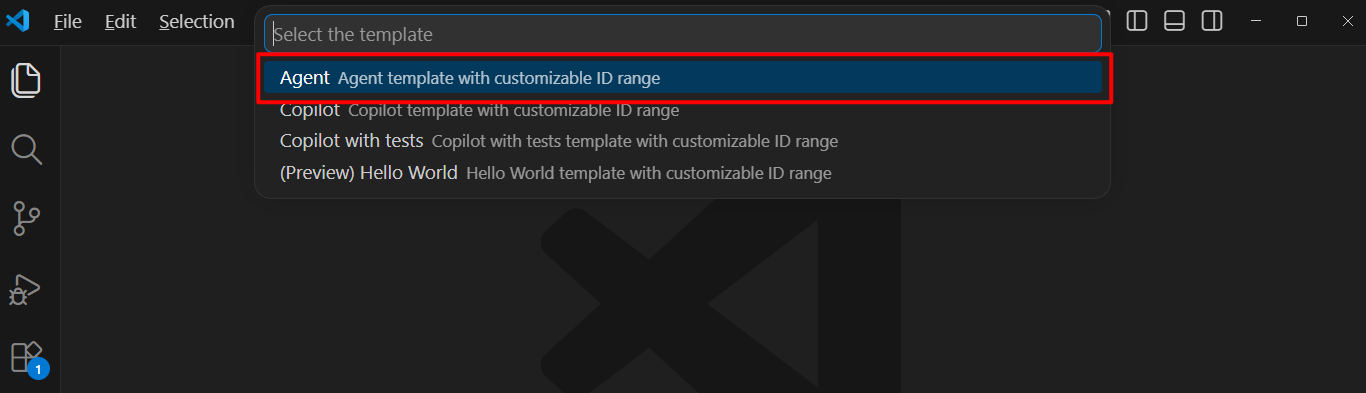
In BC28, the AL Language extension adds an Agent template to the AL: New Project command in VS Code, and the template comes with getting-started instructions for building Business Central agents. Setting up a project means picking an empty folder, entering a starting object ID, choosing a server and downloading symbols.
 post Dynamics 365 Lab
"You can easily design and code agents using this template."
Key points
- A new Agent template is available via the AL: New Project command in VS Code
- The template includes instructions for getting started with agent development
- Users configure object ID ranges, select servers, and download symbol files through the template workflow
- This builds on the AL: New Project command introduced in BC26
Quotes
- “You can easily design and code agents using this template.” (Highlights the practical benefit for agent development workflows)
Context
- Features: Agent template, AL: New Project command
- Versions: BC28, 2026 release wave 1
Source: Dynamics 365 Lab - Yun Zhu, community blog. Summary, key points and quotes are derived (CONTENT-NOTICE.md); read the original for the full text.