AL Language extension 16.0
AL Language extension 16.0 for Business Central 2025 release wave 2 (BC27): previewed 2025-03-24, released 2025-10-01; 20 changelog entries, 21 GitHub issues linked.
- BC27Business Central
- 2025-03-24preview
- 2025-10-01released
- 20entries
- 21issues
Changelog on the Visual Studio Marketplace · Business Central 2025 release wave 2 · BC27
Support for new ExtendedDataType value: Document
The ExtendedDataType property for Media and MediaSet fields now also supports the Document value.
On pages, these fields can only be used on ListPart and CardPart page types, allowing the client to correctly render elements in FactBoxes, such as displaying a PDF as a portrait image.
Introducing MaskedType enum field-level property.
A new MaskType enum property is introduced with the values Concealed and None. The default value is None.
When set, MaskType instructs the web client to display the field with its value hidden by default, allowing users to toggle visibility and view the value in plain text.
The use of the MaskType property is restricted by AW0017, which prohibits setting this property on fields inside repeater controls.
Allow copying nodes in the profile editor and support for hovering
In the profile editor, individual nodes can be copied and hovered to show the full text of the node. This allows for easier editing of long nodes, such as SQL queries.
Cancel publish and package commands
Publishing and packaging AL applications can now be canceled from the Visual Studio Code UI.
New Business Central Themes for Visual Studio Code
We are excited to introduce two new themes: Business Central Light and Business Central Dark. These themes prominently feature our favorite color; teal, and are included in the .vsix package. We hope you enjoy the refreshed look and feel they bring to your development experience!
ALDoc: Improvements
Namespaces can now be documented and when they are, an “Overview” entry is added in the table of contents. The overview includes objects and events from the namespace. The recommended way to document a namespace is to include a source file named after the namespace with ‘.Namespace.al’ appended just containing the documentation and the namespace declaration as the example below:
/// <summary>
/// Summary of the namespace functionality
/// </summary>
/// <remarks>
/// Some clever remarks
/// </remarks>
namespace MyCompany.MyNamespace;
The aldoc tool is updated to support the latest version of DocFx (2.78.3) when generating the docfx.json file. Existing documentation folders can be updated with the following command:
aldoc refresh -o <doc folder>which adds a "_disableToc": false setting to the globalMetadata of the docfx.json file and refreshes the Business Central docfx templates.
Summary System Part Support
With this release, we Introduce a new system part of type Summary that can be controlled on Card, Document, and ListPlus pages. This allows developers to hide or configure the Summary factbox when it’s not needed.
Control the Summary part in page extensions using the identifier DefaultSummaryPart:
pageextension 50101 MyPageExtension extends "Customer Card"
{
    layout
    {
        modify(DefaultSummaryPart)
        {
            Visible = false;
        }
    }
}
Or, define it explicitly in new pages like this:
page 50101 MyPage
{
    layout
    {
        area(FactBoxes)
        {
            systempart(DefaultSummaryPart; Summary)
            {
                Visible = false;
            }
        }
    }
}
Note that there can only be one summary system part per page.
ALTool: New “compile” Command Support
ALTool now supports invoking alc for compiling AL packages. The syntax is:
altool compile <alc arguments>This feature is particularly useful when used with the Business Central Development Tools NuGet package. The package is a .NET tool that includes the AL development tools required for pipelines. Unlike the .vsix installation, it can easily be installed in a pipeline. When installed as a global tool, you can start a compilation by using the following command:
AL compile <alc arguments>The AL command acts as a convenient alias for ALTool when installed via the NuGet package.
To explore all available commands for ALTool (or AL alias), run the tool without any arguments. Currently supported commands include:
| Command | Description |
|---|---|
compile |
Compile a package using alc.exe. |
GetPackageManifest |
Retrieve the manifest from a .app file. |
CreateSymbolPackage |
Create a symbol-only package from a .app file. |
GetLatestSupportedRuntimeVersion |
Get the latest supported AL runtime version for a platform version. |
help |
Display detailed information about a specific command. |
version |
Display version information. |
This enhancement streamlines the AL development process, especially in CI/CD pipelines, by providing a more accessible and efficient way to compile AL packages.
Go To Symbol in Workspace
The Visual Studio Code feature “Go To Symbol In Workspace” (Ctrl + T) has been extended to search for a broader range of AL symbols. In addition to application objects, it now includes procedures, events, global variables, page controls, page actions, table fields, and many more.
This new way of searching can be disabled under the setting “al.extendGoToSymbolInWorkspace.enabled”. In addition, you can configure the maximum amount of symbols to display with the “al.extendGoToSymbolInWorkspace.ResultLimit” setting. Use the “al.extendGoToSymbolInWorkspace.IncludeSymbolFiles” setting to specify if the search should include the dependencies symbol files.
RecordRef - Get field by name
New overloads are added to the Field and FieldExist methods, which allows searching for a field by its name.
Editable fields in page customizations
You can now make page fields defined in page customizations editable. Previously, such fields were always read-only, unlike fields declared in pages or page extensions.
pagecustomization MyPageCust customizes MyPage
{
    layout
    {
        addfirst(Content)
        {
            field(MyPageCustField; Rec.MyTableField) { Editable = true; }
        }
    }
}
To give AL developers more control over how table fields are used in customizations, new values have been added to the AllowInCustomizations property:
Never– still excludes a table’s fields from the in-client designer.AsReadOnly– allows use in page customizations, but only as read-only.AsReadWrite– allows fields to be made editable in page customizations.
The default value ToBeClassified and the obsolete value Always both behave like AsReadOnly.
For efficiency, AllowInCustomizations can now also be set at the table and table extension level. On table extensions, this only applies to fields declared in the table extension and does not affect the base table fields.
To support field classification, new analyzer rules are introduced: AS0138, AS0139, and PTE0026. These rules are currently optional and do not block AppSource submissions or PTE uploads. Learn more in the dedicated sections for analyzer rules.
Semantic Highlighting Improvements
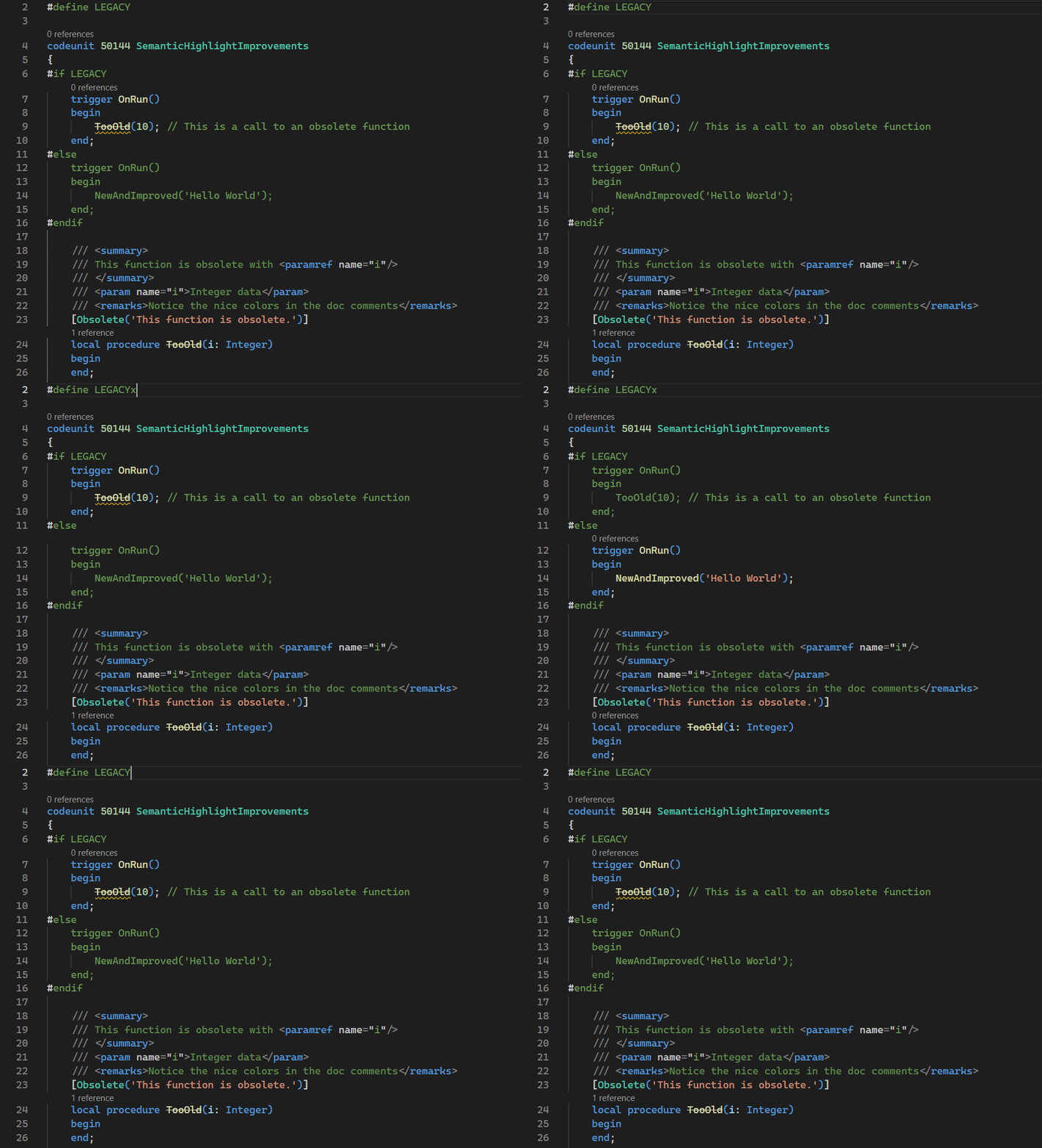
- Code made inactive using #if/#else/#endif directives is now shown in the same color. This improves readability when using Conditional directives. There is a known issue with brackets (parentheses, begin/end, curly braces, etc.) if bracket pair colorization is active. Unless
"editor.bracketPairColorization.enabled": false, brackets will still have colors when code is inactive. - XML documentation comments now support Semantic Highlighting if the selected theme supports it. Try the Visual Studio 2019 Dark & Light themes.
- Obsolete symbols now also support Semantic Highlighting.
Reporting
- Allow empty dataitems when emitting Excel layouts with multiple datasheets (error if no data items contains columns which would result in a workbook with no data sheets).
- Add new layout information fields in the aggregated metadata sheet for the Excel layout template (object caption, local date. and UTC timezone offset).
- Updated report Word layout XML, enabling layouts to be compatible with the new data picker in the Word add-in; and it now includes the ‘Obsolete State’ attribute for Report Column and DataItem elements.
ALDoc Improvements
- New option (–includeinternals) to include internal symbols in the generated documentation.
- Fixed navigational links to other reference symbols
- Reference to other objects contains object type.
- New fallbacks in case of missing symbol documentation
- Promote
AboutTextproperty to page or report summary - Promote
Tooltipproperty to table fields summary
- Promote
- New ALDoc option (–targetpackageslist) accepts space-separated values to support target package names containing commas (unlike –targetpackages).
For example,
--targetpackageslist "TechCore,Inc" "Fintech Corp" "Global Solutions, Ltd"
TestType Property in AL tests
We have introduced a new TestType property in test codeunits, which allows engineers to specify the primary purpose and scope of the test.
The property can be used to group tests for execution and reporting in CI/CD pipelines.
RequiredTestIsolation Property in AL tests
We have introduced a new RequiredTestIsolation property in test codeunits, which allows engineers to set the required TestIsolation for the test codeunit to run in. If the selected TestRunner does not satisfy the test codeunit’s RequiredTestIsolation property, then the tests might fail.
The property can be used to group tests for execution and reporting in CI/CD pipelines.
If a test codeunit has RequiredTestIsolation = None, then it can run by a TestRunner with any TestIsolation.
If a test codeunit has RequiredTestIsolation = Codeunit, then it requires a TestRunner with Codeunit TestIsolation.
If a test codeunit has RequiredTestIsolation = Function, then it requires a TestRunner with Function TestIsolation.
If a test codeunit has RequiredTestIsolation = Disabled, then it requires a TestRunner with Disabled TestIsolation.
AppSourceCop
- New rules AS0136 and AS0137 which will allow the change of field IDs for tables and table extensions under specific conditions. The feature is enabled only for Microsoft applications for now.
- New rule AS0138 validating that table fields are classified with a value different from
ToBeClassifiedandAlways. This rule will not fail AppSource submissions as it is not enabled by default and requires a ruleset to be enabled. - New rule AS0139 validating that newly added table fields are classified with a value different from
ToBeClassifiedandAlways. This rule will not fail AppSource submissions as the default severity isWarning. - Relaxed rule AS0018 to allow removal of non-obsolete procedures referencing an obsolete removed table or a removed application application within an array parameter or array return type.
PerTenantExtensionCop
- New rule PTE0026 validating that table fields are classified with a value different from
ToBeClassifiedandAlways. This rule will not fail PTE uploads as it is not enabled by default and requires a ruleset to be enabled.
GitHub Issues
- #7885 No object ID suggested when namespace is used
- #8004 PageCustomization IntelliSense - Fields of PageExtensions missing
- #7741 AA0198 is not reported for return variables of procedures
- #7949 Convert page control tooltip to table control tooltip does not work for non-Rec variables.
- #7988 AL0155 is raised for ReportExtension but not on other extension objects
- #8020 Unable obsolete usercontrol
- #8002 False positive AA0210 on CustomTable SystemId SetRange
- #7874 False positive for AA0206 when using DateTime.Date() or DateTime.Time()
- #8005 AA0137 missing warning for global variables on report extensions
- #8078 dotnet tool al returns exit code 1 when displaying help information
- #7477 Semantics are lost on Enum values if AsInteger has no parentheses
- #7867 AA0248 in Pageextensions not working as expected
- #7996 Snapshot debugging via “Help & Support” doesn’t work if .vscode folder exists
- #7985 No AA0218 warning on certain role center actions
- #8015 Error 85132273 during Publish and Install application
- #8039 generateCrossReferences not working - System.AggregateException due to System.NullReferenceException
- #8036 Unable to authenticate to BC on Linux #8036
- #8059 Analyzer ‘Microsoft.Dynamics.Nav.CodeCop.Design.Rule139DoNotAssignToStringWithSmallerCapacity’ threw an exception of type ‘System.InvalidCastException’
- #8058 ALDOC fails when app publisher name contains a comma
- #8061 Debugger does not show named return variable
- #8069 AL Language Opens Problem Pane on Every Project Open
Miscellaneous
-
Error diagnostic for defining methods with an empty name.
-
RAD publishing will stop if there are no detected application object changes.
-
Implicit conversion from
TestFilterFieldtoVariantorJokeris no longer allowed, correcting for a previous issue where such conversions would result in a runtime error. -
Fixed an issue where it was not possible to refer to members (eg. fields) added by page extensions via a page customization on the same application.
-
Fixed an issue where return values which collided with global variables did not produce a warning.
-
Fixed an issue where AL:Package copied an empty app file to other projects in the same workspace that were referencing the packaged one. The issue only occured when the
compilationOptionsoutFolderwas set to a relative path. -
When the manifest file is saved, analyzer diagnostics will no longer disappear.
-
Fixed some cases where diagnostics would be emitted for an older version of the source.
-
The methods
Visible()andEnabled()are now available onTestPartobjects. -
UpdateAuditFieldsonDataTransferis now in Cloud scope. -
More diverse tokens for semanticTokenColorCustomizations
-
Added new CodeCop rules to ensure
AutoFormatTypeandAutoFormatExpressionproperties are correctly specified for decimal fields:- AA0471:
AutoFormatTypemust be specified for decimal fields on pages. - AA0472:
AutoFormatExpressionmust be specified for decimal fields on pages whenAutoFormatTypeis 1, 2, or 10. - AA0473:
AutoFormatTypemust be specified for decimal fields on tables. - AA0474:
AutoFormatExpressionmust be specified for decimal fields on tables whenAutoFormatTypeis 1, 2, or 10.
These rules are disabled by default and must be enabled via a ruleset.
- AA0471:
-
Add support for Truncate on Record and RecordRef, and a CodeCop rule to ensure it is only used where applicable.
- AA0475:
Truncatecan only be used on normal tables without media fields and outside of try functions.
- AA0475:
-
Add support for custom Microsoft Entra ID authentication overrides in settings. The new setting is
al.entraIdAuthentication, a complex type consisting of one or more of the following properties:endpoint(ex. https://login.microsoftonline.com),clientId(ex. 41839ce3-4041-4bac-8c17-0941f25d7aaf),redirectionUri(ex. https://developer.businesscentral.dynamics.com),scope(ex. https://api.businesscentral.dynamics.com/.default). See Public client and confidential client applications for reference on creating a public client. -
Fixed an issue where entering credentials after failed requests would not respect user’s request to cancel (pressing Esc).
-
Compilation will now fail more gracefully when the
app.jsonfile is malformed. -
Fixed an issue where
Labeltype variables coming from dependency apps would be displayed as MissingTypeSymbol if the label has MaxLength defined. -
Supports having collections with RecordRefs
-
Add
Guid.CreateGuid(same asCreateGuid) andGuid.CreateSequentialGuidwhich creates a new unique GUID which is more performant when used in a table key. -
Add
LockTimeoutDurationallow increasing/lowering lock timeout instead of only disabling/enabling it. -
Fixed an issue where the altpgen tool would fail if the project contained references to apps with relevant table extensions.
Source: Visual Studio Marketplace, ms-dynamics-smb.al changelog, Microsoft’s text unchanged. Dates from the gallery’s upload records.