Dynamics 365 Business Central: AL Query objects and the new ReadState property.
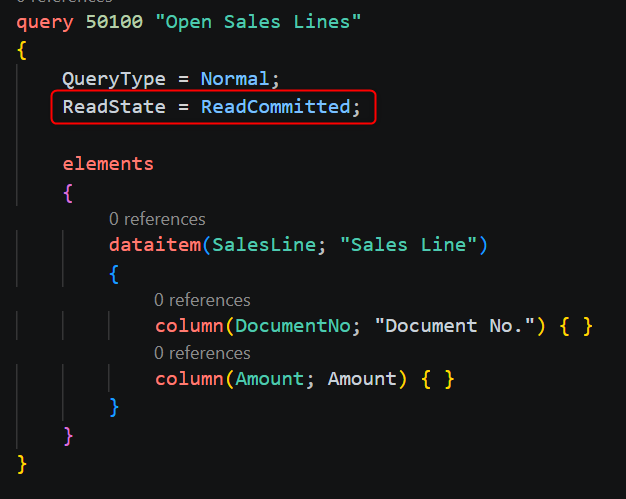
AL query objects now support the ReadState property in Dynamics 365 Business Central 2026 Wave 2 to control transaction isolation levels. This lets developers choose between ReadUncommitted (fast, unreliable), ReadCommitted (safe middle ground), ReadShared (stable until transaction end), and ReadExclusive (prevents other changes) based on whether the query displays data or drives business decisions.
 post Stefano Demiliani
"The ReadState property takes precedence, so it is the only lever that matters for them."
Key points
- Query objects describe result sets by declaring tables as data items and choosing columns, supporting filtering, grouping, and aggregation.
- ReadState property lets developers specify transaction isolation levels for individual queries, overriding CurrentTransactionType.
- Four isolation levels available: ReadUncommitted (default, fast but risky), ReadCommitted (sees only committed data), ReadShared (adds locks until transaction ends), and ReadExclusive (prevents others from changing rows).
- Strictest lock wins across multiple reads of the same row; stricter reads are safer but cause more waiting for other sessions.
- Display queries can use ReadUncommitted, but decision-driven and modification queries need ReadCommitted or stricter options.
Quotes
- “The ReadState property takes precedence, so it is the only lever that matters for them.” (Clarifies that ReadState overrides CurrentTransactionType for queries, making it the definitive control for transaction isolation.)
Context
- Features: ReadState property, transaction isolation levels, ReadUncommitted, ReadCommitted, ReadShared, ReadExclusive, query locking, OData endpoints
- Versions: 2026 Wave 2, version 29, runtime 18
Source: Stefano Demiliani, community blog. Summary, key points and quotes are derived (CONTENT-NOTICE.md); read the original for the full text.