BC Friday Tips #76 Barcode Fonts in RDL Reports
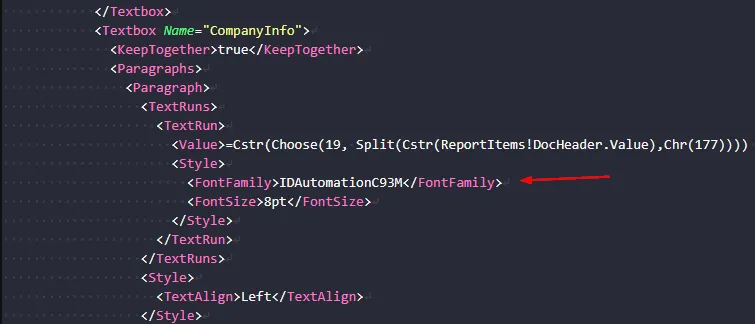
Creating barcodes in Business Central SaaS reports requires setting the FontFamily property directly in RDL files without installing fonts locally. This approach works out of the box and supports various barcode types like Code 93 using fonts such as IDAutomationC93M.
Read it hereOpen in Claudehttps-thatnavguy-com-blog-2026-bc-friday-tips-76-barcode-fonts-in-rdl--2785e5dd8e.md
 post That NAV Guy
"You don't need to install a barcode font to develop barcodes on reports in BC SaaS."
Key points
- Set FontFamily directly in RDL text boxes to render barcodes without local font installation
- Business Central SaaS supports barcode fonts natively through RDL configuration
- Font names for different barcode types can be found at idautomation.com or via AI assistance
- No additional setup or font installation needed on developer machines
Quotes
- “You don’t need to install a barcode font to develop barcodes on reports in BC SaaS.” (Clarifies that barcode fonts work natively in SaaS without local installation, reducing setup complexity.)
- “Just find the text box in the RDL that should render as a barcode, and set the FontFamily to the correct font name.” (Provides the practical method for implementing barcodes directly in RDL files.)
Context
- Features: RDL report barcode support, FontFamily configuration
Source: That NAV Guy, community blog. Summary, key points and quotes are derived (CONTENT-NOTICE.md); read the original for the full text.