Dynamics 365 Business Central: How to convert Text/Integer to Date (Text/Integer Data type -> Date Data type)
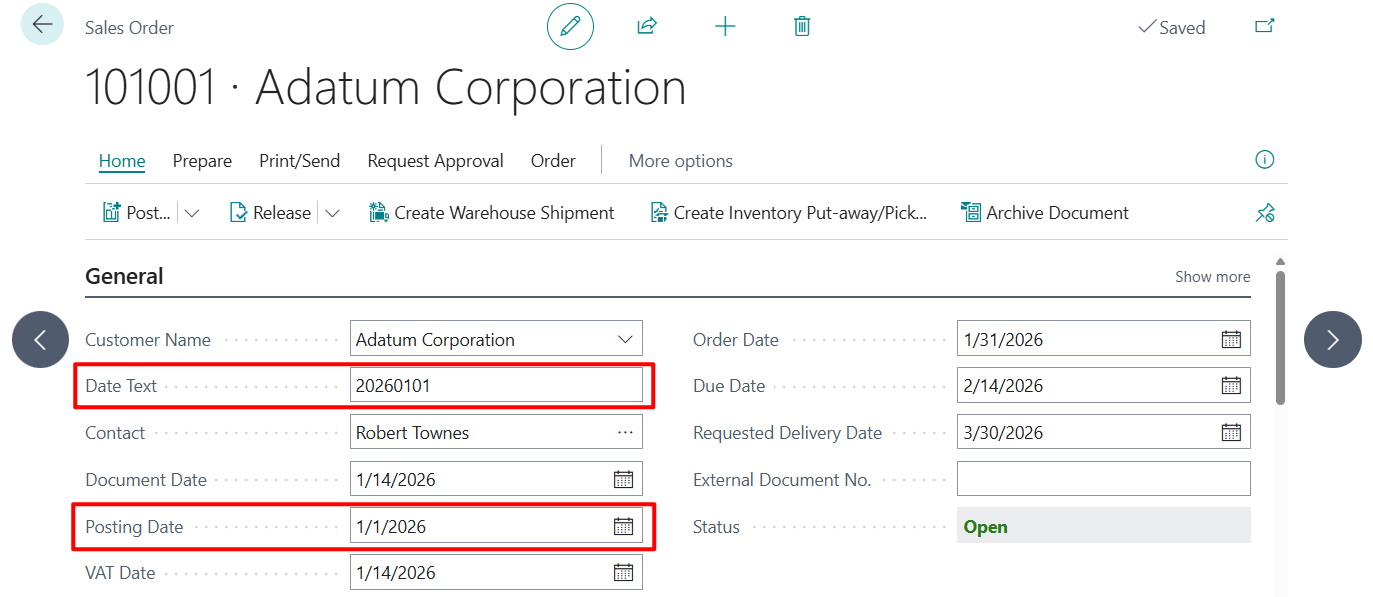
This guide demonstrates how to convert Text and Integer data types to Date in Business Central AL development. It covers using the Evaluate method with regional settings, the DMY2Date function with string slicing for fixed formats, and techniques for parsing serialized integers in YYYYMMDD format.
 post Dynamics 365 Lab
"It uses the user's regional settings to parse the string. Always wrap it in an if statement to handle formatting errors gracefully."
Key points
- Use System.Evaluate() to parse text strings into Date variables while respecting user regional settings, always wrapping in error handling
- For fixed-format strings like YYYYMMDD, use CopyStr to extract day/month/year components, then DMY2Date() to construct the date
- Integer-to-date conversion requires parsing the integer into separate day, month, and year integers before using DMY2Date(), since integers don’t inherently represent dates
- Serialized integers in YYYYMMDD format can be broken apart using either string conversion methods or mathematical division operations
Quotes
- “It uses the user’s regional settings to parse the string. Always wrap it in an if statement to handle formatting errors gracefully.” (Essential practice for robust data conversion that respects user localization and prevents runtime errors)
- “If you receive a fixed format (like YYYYMMDD) that doesn’t match the user’s locale, use CopyStr to break it down” (Provides reliable handling of standardized date formats that differ from user regional settings)
AL objects mentioned
As named in the post. A name that matches one object page by exact type and name links to it; the others stay as named.
- other “SalesOrderExt”
Context
- Features: System.Evaluate method, System.DMY2Date method, String slicing with CopyStr, Text to Date conversion, Integer to Date conversion, Error handling for date parsing, Locale-aware date formatting
Source: Dynamics 365 Lab - Yun Zhu, community blog. Summary, key points and quotes are derived (CONTENT-NOTICE.md); read the original for the full text.