Dynamics 365 Business Central: Cancelling a scheduled PTE update install (Next Major/Next Minor)
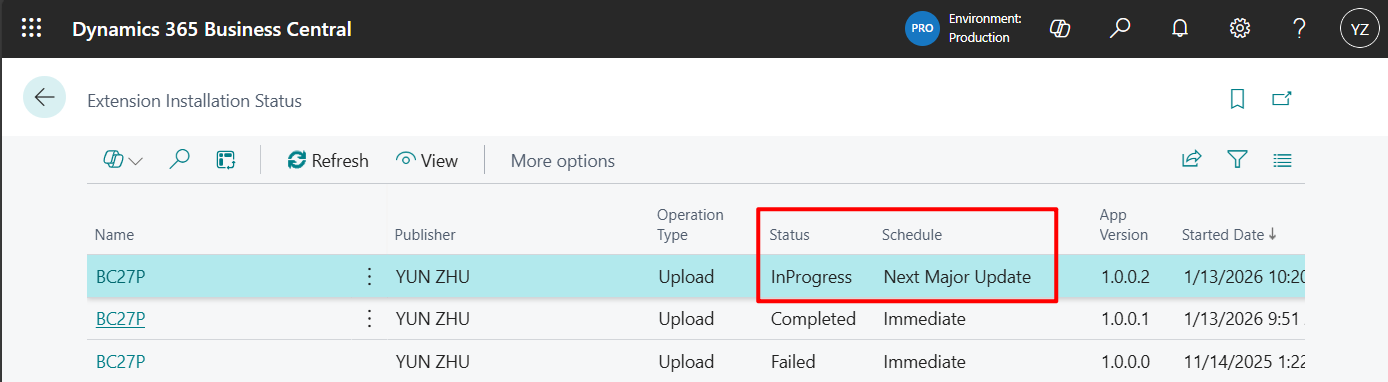
The post explains how to cancel a scheduled app update when deploying to the next version in Business Central. Since the Extension Installation Status page lacks a cancel action, the solution is to upload the same app version again to overwrite the scheduled installation details.
 post Dynamics 365 Lab
"It's actually very simple, just upload same version again. This will overwrite the original schedule details."
Key points
- Re-uploading the same app version overwrites the original schedule, which is the workaround for cancelling a pending Next Minor or Next Major install
- The Extension Installation Status page has no cancel action for scheduled installs
- If the app contains next-version changes, the re-upload will fail to install on the current version, so extra steps are needed to prevent installation
- BC23 Apps Update Cadence lets environments auto-update apps with minor updates and schedule individual app updates
- A later update notes that BC29 adds cancelling scheduled PTE installs in the admin center
Quotes
- “It’s actually very simple, just upload same version again. This will overwrite the original schedule details.” (Provides the direct solution to cancel scheduled app updates without a native cancel action)
- “Microsoft is introducing an environment-level setting that automatically updates all installed apps with every minor update, and lets you schedule individual app updates.” (Explains the Apps Update Cadence feature that changed how app updates are managed starting in BC23)
AL objects mentioned
As named in the post. A name that matches one object page by exact type and name links to it; the others stay as named.
- page 2500 “Extension Management”
- page “Extension Installation Status”
Not found in BC28-30: page “Extension Installation Status”.
Possibly related
No source states these links: they share an object, a model read them, or a person found the same subject.
- Dynamics 365 Business Central: How to set Allow HttpClient Requests for multiple extensions (selected extensions) at the same time — possibly related: both name Page 2500 “Extension Management”
- Dynamics 365 Business Central: Upload, install, and manage PTEs in the admin center (Remove ability to upload and install PTEs from Extension Management page) — possibly related: both name Page 2500 “Extension Management”
- How I Recreated the Extension Upload Experience in Business Central — possibly related: both name Page 2500 “Extension Management”
- Store Files Outside Business Central Using External File Accounts (BC 2025 Wave 1) — possibly related: both name Page 2500 “Extension Management”
Heads up
- gotcha: “If this app includes an update for the next version, installation will fail on the current version.”
Context
- Features: Apps Update Cadence, Extension Upload, Deployment Status, Schema Sync Mode, App Uninstall
- Versions: BC23, BC29
Source: Dynamics 365 Lab - Yun Zhu, community blog. Summary, key points and quotes are derived (CONTENT-NOTICE.md); read the original for the full text.