Business Central 2026 release wave 1 (BC28): Copy Existing Locations to Create New Locations (Copy Location)
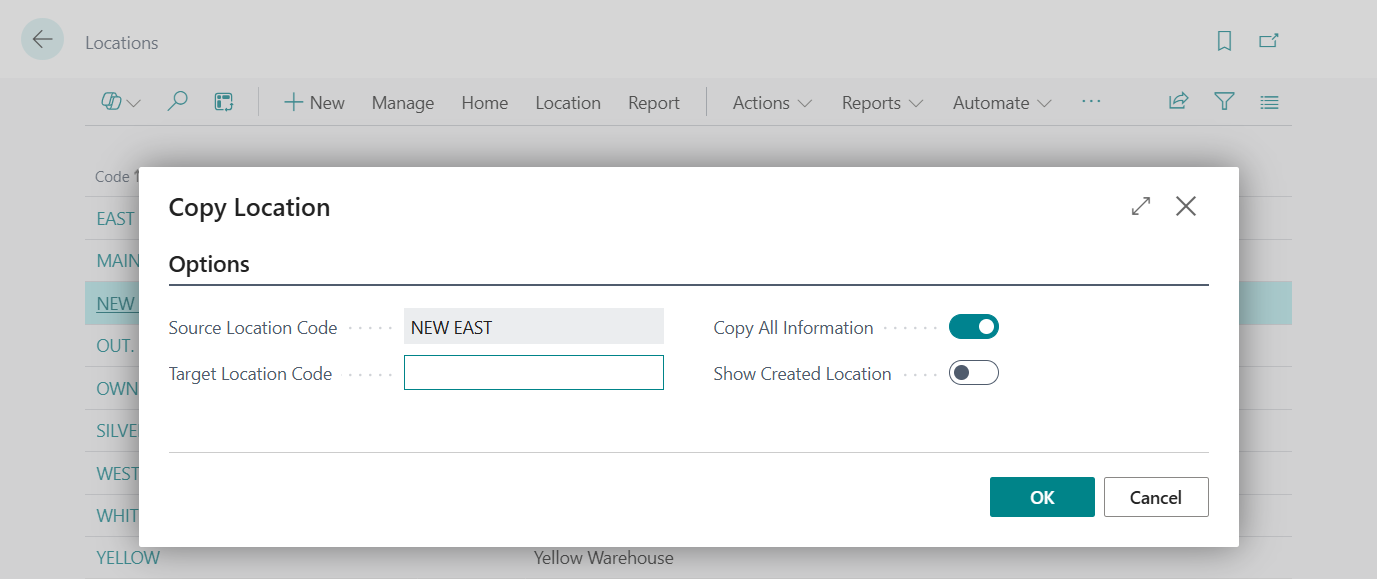
Business Central 2026 release wave 1 introduces a Copy Location feature that allows users to quickly duplicate existing location records to create new warehouse locations, eliminating the need for manual entry or Configuration Packages.
 post Dynamics 365 Lab
"Traditionally, creating multiple locations required manual entry or Configuration Packages. But with this wave (BC28), it's as simple as clicking a button."
Key points
- BC28 adds a Copy Location action on the Locations list (under Actions, Other) and on the Location Card
- You pick an existing location, fill in the fields on the Copy Location page, and choose OK to create the new location
- This replaces creating locations by manual entry or with Configuration Packages
- It works like the existing Copy Item feature, and the author hopes Microsoft adds copy support for all master data
Quotes
- “Traditionally, creating multiple locations required manual entry or Configuration Packages. But with this wave (BC28), it’s as simple as clicking a button.” (Demonstrates the efficiency improvement the Copy Location feature provides over previous setup methods)
- “Hopefully, Microsoft expands this ‘Copy’ capability across all master data - it would save so much setup time!” (Indicates the broader value and future potential of this copying pattern for other Business Central setup tasks)
AL objects mentioned
As named in the post. A name that matches one object page by exact type and name links to it; the others stay as named.
Possibly related
No source states these links: they share an object, a model read them, or a person found the same subject.
- Direct transfers from warehouse-enabled locations in Business Central 2026 wave 2 — possibly related: both name Page 5703 “Location Card”
- Dynamics 365 Business Central: How to hide/disable New, Edit (Edit List), and Delete actions on the page — possibly related: both name Page 5703 “Location Card”
- How to Set Up Locations in Business Central (2025) — possibly related: both name Page 5703 “Location Card”
- How to Use the Copy Location Feature in Business Central 2026 Wave 1 (BC28) — possibly related: both name Page 5703 “Location Card”
- What’s New in Manufacturing: Integration to Warehouse (2025 release wave 1) — possibly related: both name Page 5703 “Location Card”
Context
- Features: Copy Location, Location management, Warehouse setup
- Versions: 2026 release wave 1, BC28
Source: Dynamics 365 Lab - Yun Zhu, community blog. Summary, key points and quotes are derived (CONTENT-NOTICE.md); read the original for the full text.