Dynamics 365 Business Central: How to easily prevent users from adding or modifying Links and Notes (Making Links and Notes Read-Only)
Making Links and Notes read-only in Business Central by excluding Insert, Modify, and Delete permissions on the RecordLinks system table prevents users from creating or editing these record annotations while keeping the UI elements visible.
 post Dynamics 365 Lab
"If you only allow read-only permissions for users, you just need to exclude the Insert, Modify, and Delete permissions for RecordLinks (2000000068)."
Key points
- Links and Notes use the RecordLinks system table (2000000068) for data storage
- Excluding Insert, Modify, and Delete permissions on RecordLinks makes Links and Notes read-only
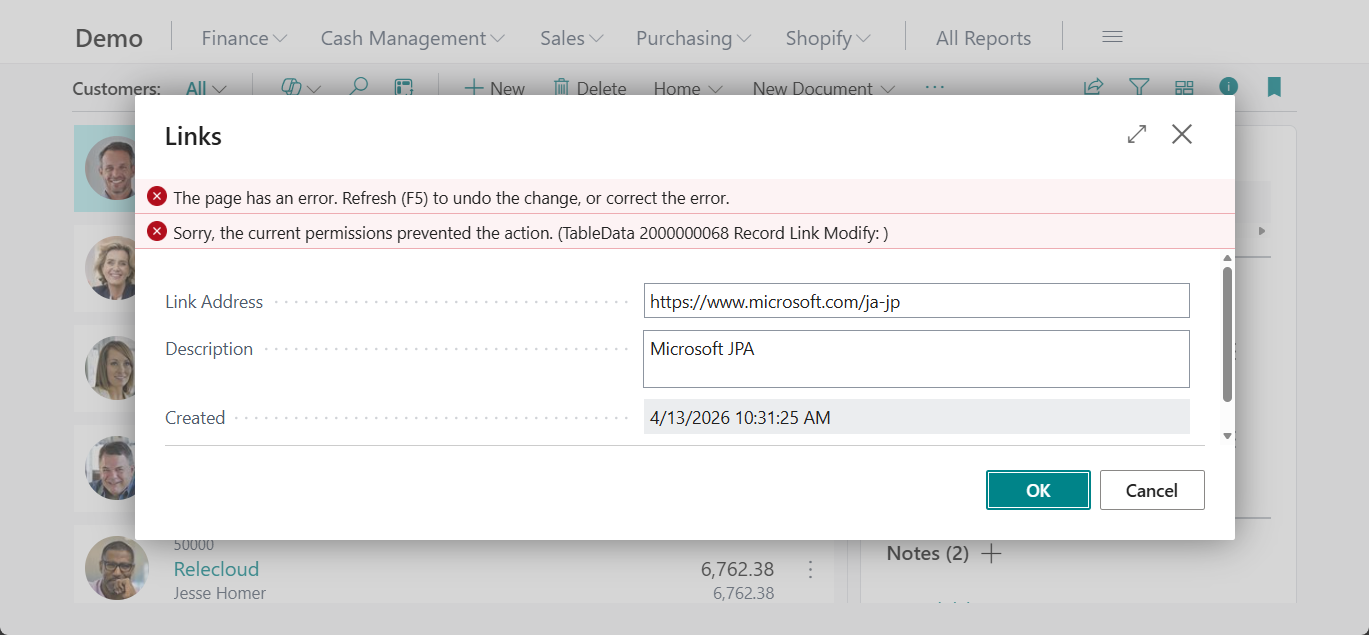
- UI actions remain visible but trigger insufficient permissions errors when users attempt to save changes
- Excluding Read permission entirely hides Links and displays Notes as an empty box
Quotes
- “If you only allow read-only permissions for users, you just need to exclude the Insert, Modify, and Delete permissions for RecordLinks (2000000068).” (This is the core technique for making Links and Notes read-only without hiding the UI elements)
AL objects mentioned
As named in the post. A name that matches one object page by exact type and name links to it; the others stay as named.
- table “RecordLinks”
Not found in BC28-30: table “RecordLinks”.
Heads up
- gotcha: “You cannot use system table 2000000068 in the Configuration Package.” (about table RecordLinks)
- warning: “As of now, systempart cannot be extended.”
Context
- Features: Links system part, Notes system part, Permission exclusion, Record annotations
- Versions: 17.0
Source: Dynamics 365 Lab - Yun Zhu, community blog. Summary, key points and quotes are derived (CONTENT-NOTICE.md); read the original for the full text.