Business Central 2026 release wave 1 (BC28): Audit user and group permissions across apps (new Permissions Overview page)
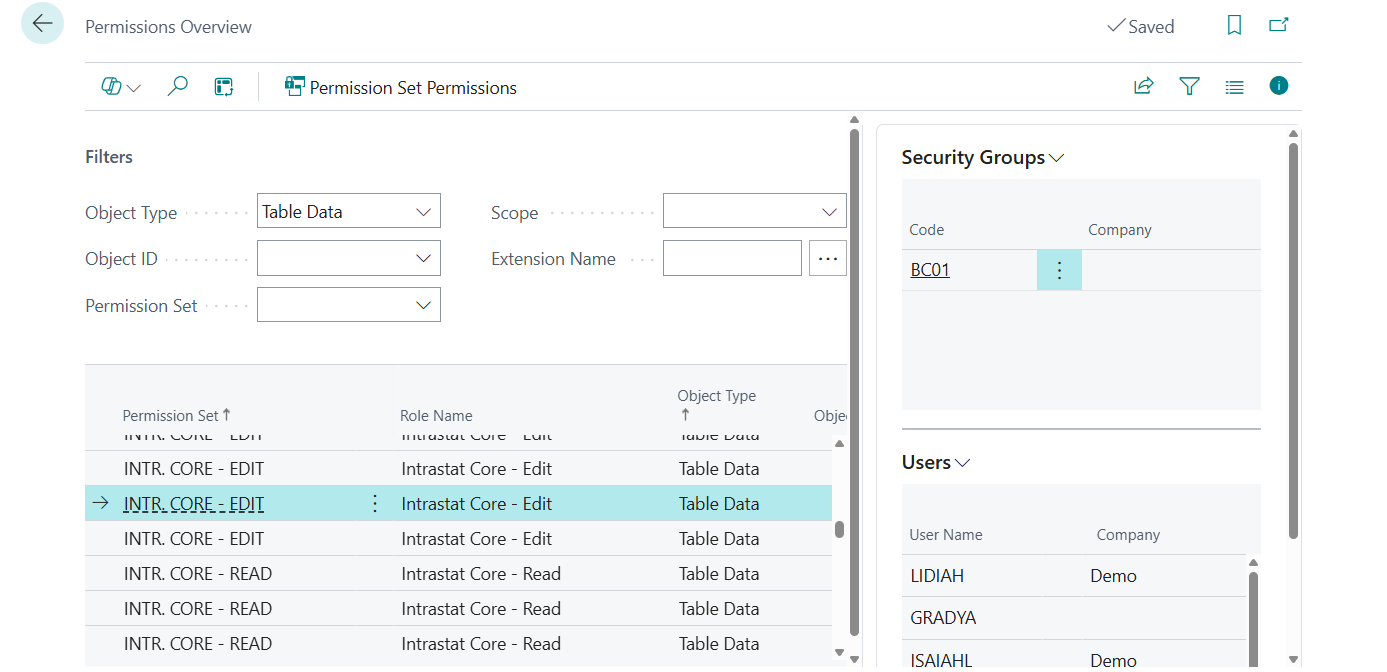
Business Central 2026 release wave 1 introduces a new Permissions Overview page that provides centralized visibility into permission sets across all installed apps and extensions. This feature helps administrators audit user and group permissions, analyze permission dependencies, and manage access control more efficiently.
 post Dynamics 365 Lab
"The new Permissions Overview page provides comprehensive visibility into permission sets across all installed apps and extensions."
Key points
- The Permissions Overview page displays permission sets from Microsoft, ISV applications, and user-defined sets in a single unified view
- Administrators can filter permissions by object, scope, extension, or permission set to quickly locate specific access rules
- The page shows which permission sets grant access to specific objects and which security groups and users are assigned to each set
- This centralized approach simplifies security audits, permission dependency analysis, and troubleshooting access issues
Quotes
- “The new Permissions Overview page provides comprehensive visibility into permission sets across all installed apps and extensions.” (This explains the core functionality that centralizes permission management across multiple sources.)
- “This centralized view helps administrators analyze permission dependencies, conduct security audits, and troubleshoot access issues without navigating multiple pages or extensions.” (This describes the practical benefit that saves administrators time and improves security oversight.)
AL objects mentioned
As named in the post. A name that matches one object page by exact type and name links to it; the others stay as named.
Possibly related
No source states these links: they share an object, a model read them, or a person found the same subject.
- Business Central 2026 release wave 1 (BC28): Manage database index usage and cost per company (View index and Turn off indexes) — possibly related: both name Page 8700 “Table Information”
- Business Central 2026 Release Wave 1: A Mix of Platform Evolution and Practical Improvements — possibly related: both name Page 9883 “Permissions Overview”
- Business Central 2026 release wave 2 (BC29): Administrators can turn SIFT (SumIndexField Technology) indexes on/off — possibly related: both name Page 8700 “Table Information”
- Business Central: Turn SIFT Indexes on or Off — possibly related: both name Page 8700 “Table Information”
- Manage database index usage — possibly related: names Page 8700 “Table Information”
- Microsoft presents: Index management — possibly related: both name Page 8700 “Table Information”
- Quick Tip: Reading the Capacity Page in the Business Central Admin Center — possibly related: both name Page 8700 “Table Information”
- View Table Information — possibly related: names Page 8700 “Table Information”
Context
- Features: Permissions Overview page, unified permission view across apps, permission filtering by object, scope, extension, permission set assignment visibility, security group and user assignment display
- Versions: BC28, 2026 release wave 1
Source: Dynamics 365 Lab - Yun Zhu, community blog. Summary, key points and quotes are derived (CONTENT-NOTICE.md); read the original for the full text.