BC Friday Tips #84 Why Is Your Item Missing from the Sales Line Lookup?
When an item does not appear in the Sales Line item lookup, check the Blocked and Sales Blocked fields on the Item card. If either is enabled, standard filtering hides the item from the lookup, so check these fields before debugging AL code.
Read it hereOpen in Claudehttps-thatnavguy-com-blog-2026-bc-friday-tips-84-item-missing-from-sales-line-lookup--ac89a8fbc6.md
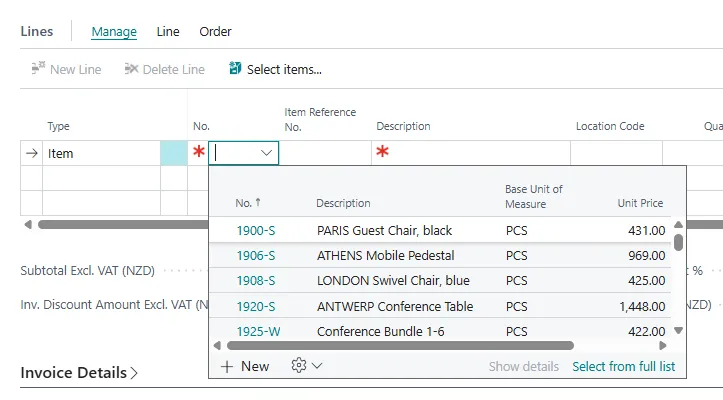
 post That NAV Guy
"If either field is enabled, the item is filtered out of the standard Sales Line lookup."
Key points
- Enabling Blocked or Sales Blocked on the Item card hides the item from the standard Sales Line item lookup.
- Check these two fields first when an item is missing from the lookup.
- Doing so can show that standard BC filtering is the cause before anyone spends time debugging AL code.
Quotes
- “If either field is enabled, the item is filtered out of the standard Sales Line lookup.” (Identifies the exact mechanism that prevents items from appearing in lookups, enabling quick resolution.)
AL objects mentioned
As named in the post. A name that matches one object page by exact type and name links to it; the others stay as named.
Possibly related
No source states these links: they share an object, a model read them, or a person found the same subject.
- BC Friday Tips #56 Understand Missing Fields in Copy Documents — possibly related: both name Table 37 “Sales Line”
- BC Friday Tips #69 Item Blocked Fields — possibly related: both name Table 27 “Item”
- Business Central 2025 wave 2 (BC27): App version in “Copy error details”/”Share details via” — possibly related: both name Table 27 “Item”
- Business Central Development Serie - Part 2b: AI for BC Development — The Knowledge Gap That Ships to Production — possibly related: both name Table 37 “Sales Line”
- Dynamics 365 Business Central: Add a Scan Barcode action and scan multiple/Continious scanning (Invoke barcode scanning programmatically from AL) — possibly related: both name Table 37 “Sales Line”
- Dynamics 365 Business Central: compressing API responses at max. — possibly related: both name Table 27 “Item”
- Dynamics 365 Business Central: Entering Quantities/Amounts by Calculation and Negative Numbers — possibly related: both name Table 37 “Sales Line”
- Dynamics 365 Business Central: How to add Filter by item attributes to the Item Ledger Entries page — possibly related: both name Table 27 “Item”
- Dynamics 365 Business Central: How to bulk import marketing text to items – Customization — possibly related: both name Table 27 “Item”
- Dynamics 365 Business Central: How to change Zero (0) of Flowfield field to Dash (-) on the page — possibly related: both name Table 27 “Item”
Context
- Features: Item lookup, Sales Line filtering, Blocked field, Sales Blocked field
Source: That NAV Guy, community blog. Summary, key points and quotes are derived (CONTENT-NOTICE.md); read the original for the full text.