Business Central 2026 release wave 1 (BC28): Create purchase orders from drop shipments
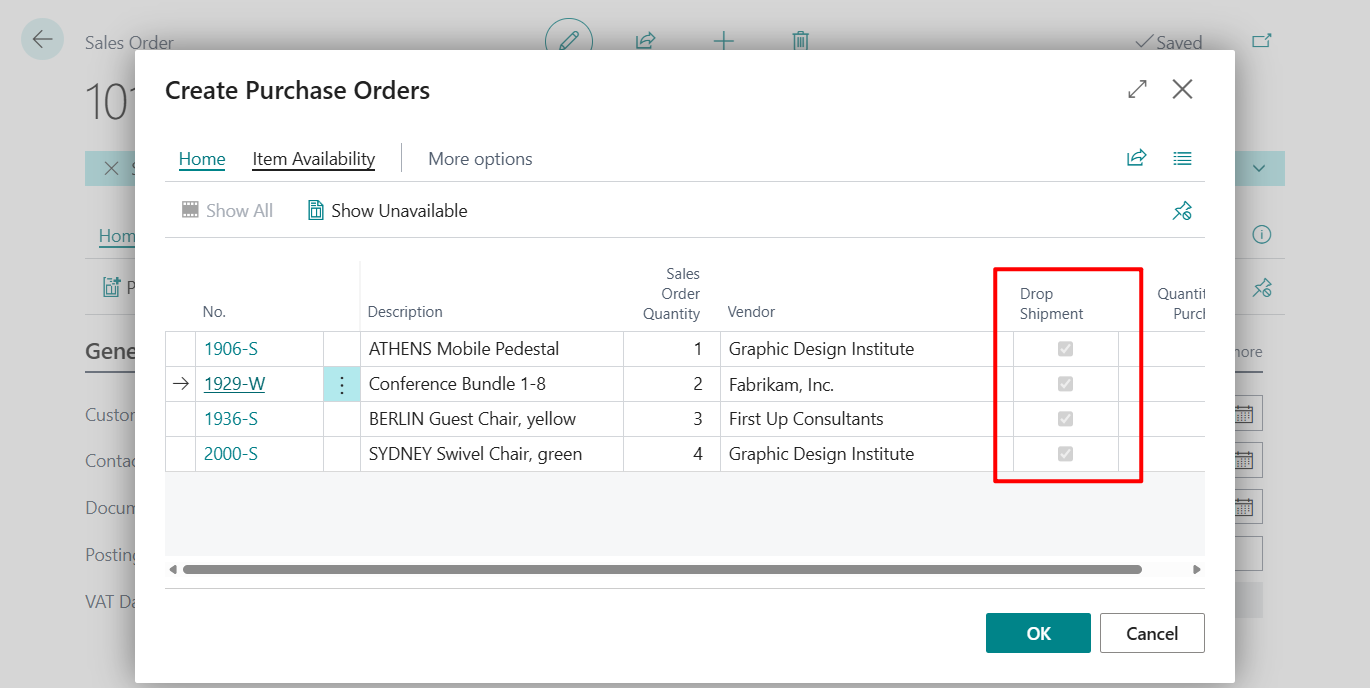
BC28 lets users create purchase orders straight from sales orders marked for drop shipment via the Create Purchase Orders action, which previously did not support drop shipments. Order Planning now includes drop shipment lines in Calculate Plan, and the Planning Worksheet gains a Drop Shipment action group with Get Sales Orders and Sales Orders actions.
 post Dynamics 365 Lab
"You can create purchase orders directly from sales orders that are set up for drop shipment by choosing the Create Purchase Orders action."
Key points
- Create Purchase Orders action now works for sales orders set up for drop shipment in BC28
- Vendor on suggested lines comes from the Item Card or Stockkeeping Unit Card and can be changed
- Order Planning’s Calculate Plan now includes drop shipment lines
- Planning Worksheet has a new Drop Shipment action group with Get Sales Orders and Sales Orders, similar to the requisition worksheet
- Classic method still works: Drop Shipment checkbox on sales line, purchase order with Ship-to Customer Address, then Get Sales Order
Quotes
- “You can create purchase orders directly from sales orders that are set up for drop shipment by choosing the Create Purchase Orders action.” (This is the core new capability introduced in BC28, streamlining the drop shipment workflow)
- “A drop shipment is the shipment of items from one of your vendors directly to one of your customers.” (Defines the business scenario that the feature addresses for users unfamiliar with drop shipment terminology)
Heads up
- gotcha: “Replenishment System must be equal to ‘Purchase’ in Requisition Line.” (about table Requisition Line, version BC28)
Context
- Features: Create Purchase Orders from drop shipments, Drop Shipment action group, Order Planning drop shipment support, Planning Worksheet drop shipment support, Customer Address Ship-to field
- Versions: BC28, 2026 release wave 1
Source: Dynamics 365 Lab - Yun Zhu, community blog. Summary, key points and quotes are derived (CONTENT-NOTICE.md); read the original for the full text.