Dynamics 365 Business Central: How to add Notes (System Parts) from FactBox to a report
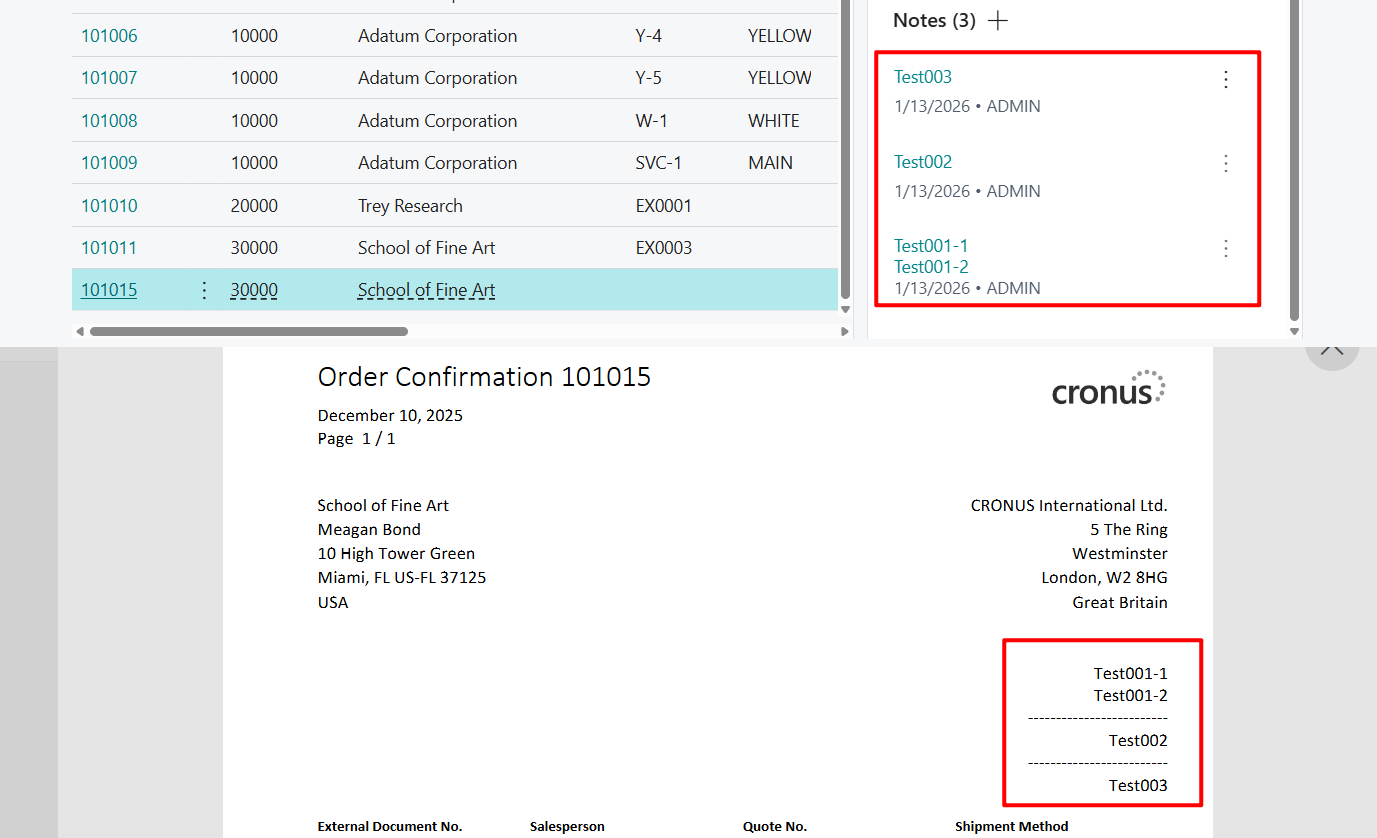
The post explains how to retrieve Notes stored in the Record Link system table and display them in Business Central reports. It demonstrates using the Record Link Management codeunit and AL code to read note blobs and add them to a report extension.
 post Dynamics 365 Lab
"The note is stored in a Blob. Microsoft has prepared a standard conversion method for us in codeunit 447 Record Link Management."
Key points
- Notes, Links, and Summary are system parts defined using the systempart() keyword in pages
- Notes data is stored in system table 2000000068 Record Link as a Blob type associated through Record ID
- Use codeunit 447 Record Link Management and its ReadNote procedure to convert note blobs to text for reporting
- Report extensions can filter notes by Record ID and Type to display them in layouts
Quotes
- “The note is stored in a Blob. Microsoft has prepared a standard conversion method for us in codeunit 447 Record Link Management.” (Explains why you need special handling to retrieve notes and which codeunit provides the solution)
- “Please try to use the standard method for better performance.” (Recommends best practice for reading note data instead of using InStream directly)
AL objects mentioned
As named in the post. A name that matches one object page by exact type and name links to it; the others stay as named.
- table “Record Link”
- codeunit 447 “Record Link Management”
- codeunit 10 “Type Helper”
- report “Standard Sales – Order Conf.”
Not found in BC28-30: table “Record Link”, report “Standard Sales – Order Conf.”.
Possibly related
No source states these links: they share an object, a model read them, or a person found the same subject.
- Dynamics 365 Business Central: How to add a “TAB” character to a string via AL — possibly related: both name Codeunit 10 “Type Helper”
- Dynamics 365 Business Central: How to add Filter by item attributes to the Item Ledger Entries page — possibly related: both name Codeunit 10 “Type Helper”
- Dynamics 365 Business Central: How to add or subtract hours from a DateTime field — possibly related: both name Codeunit 10 “Type Helper”
- Dynamics 365 Business Central: How to convert Month Name (Text) to Month Number (Integer) — possibly related: both name Codeunit 10 “Type Helper”
- Understanding AL Development: The Type Helper Code Unit — possibly related: both name Codeunit 10 “Type Helper”
Heads up
- warning: “You cannot use system table 2000000068 in the Configuration Package.” (about table Record Link)
Context
- Features: Notes system part, FactBox, Record Link storage, Blob data handling, Report extensions, Multi-line text fields
- Versions: 2025 release wave 2
Source: Dynamics 365 Lab - Yun Zhu, community blog. Summary, key points and quotes are derived (CONTENT-NOTICE.md); read the original for the full text.