Dynamics 365 Business Central: Adding comments to Factbox/Report (Displaying Comments in a FactBox/Report)
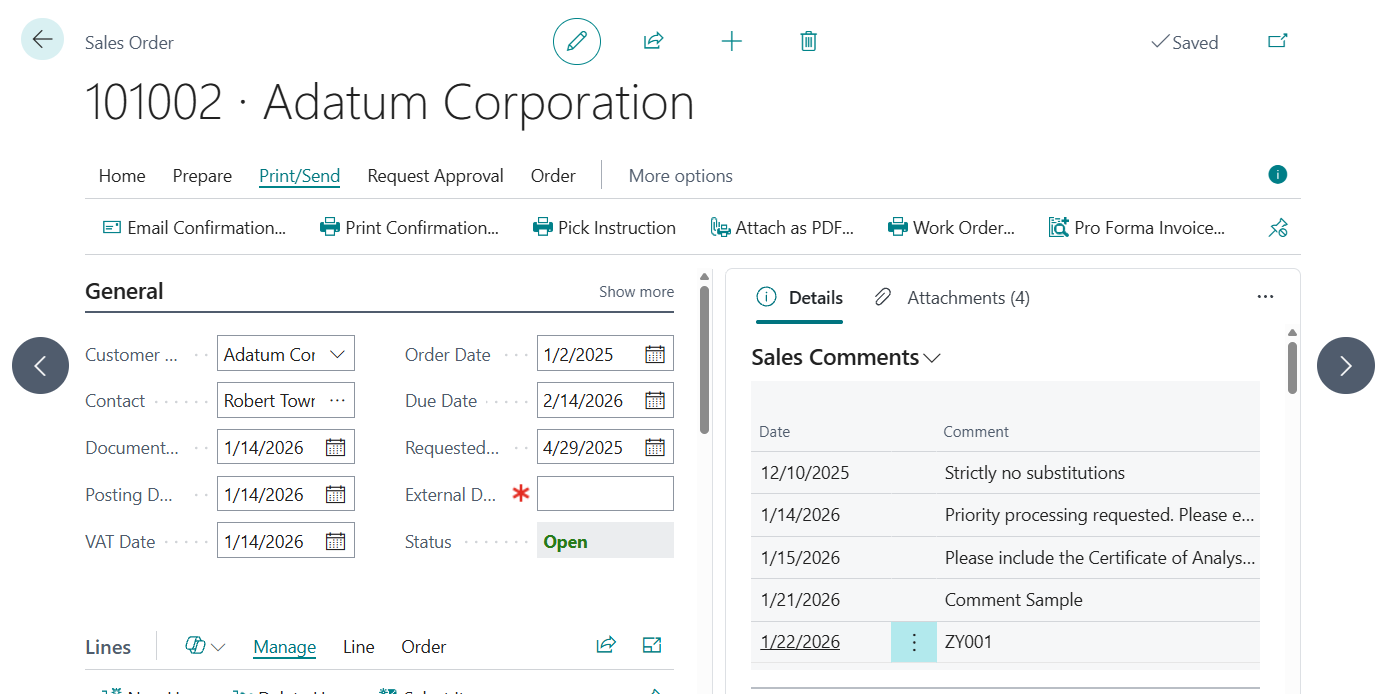
Adding comments to FactBox and reports in Business Central lets users attach contextual information to sales orders and other documents. The post shows how to display sales comments in a ListPart page extension and in reports using report extensions with dataitem linking.
 post Dynamics 365 Lab
"Comments on ongoing documents are transferred to the related posted document."
Key points
- Comments in Business Central capture extra information on cards and documents, with a limit of 80 characters per comment field.
- Comments on documents automatically transfer to related posted documents, and transfer rules can be configured in Sales & Receivables settings.
- To display comments in a FactBox, create a ListPart page for Sales Comment Line and add it to the Sales Order page extension using SubPageLink.
- Report extensions can add sales comment lines directly as dataitems linked to the header by Document Type and No., enabling comment display in printed reports.
Quotes
- “Comments on ongoing documents are transferred to the related posted document.” (This shows how Business Central automatically maintains comment information throughout the document lifecycle, reducing manual re-entry work.)
- “The Comment field has a length limit of 80 characters, Comment (6, Text[80]).” (Understanding this constraint is critical for developers designing comment capture interfaces and validating user input.)
AL objects mentioned
As named in the post. A name that matches one object page by exact type and name links to it; the others stay as named.
- table 44 “Sales Comment Line”
- page 67 “Sales Comment Sheet”
- page 42 “Sales Order”
- report 1305 “Standard Sales - Order Conf.”
Possibly related
No source states these links: they share an object, a model read them, or a person found the same subject.
- Business Central Under the Hood episode 14: Building Agents in Business Central — possibly related: both name Page 42 “Sales Order”
- Create Purchase Orders from Drop Shipments — possibly related: both name Page 42 “Sales Order”
- Directions EMEA 2023 Keynote: Business Central saves time for consultants and power users — possibly related: both name Page 42 “Sales Order”
- Dynamics 365 Business Central Blog Series: Item Attributes — possibly related: both name Page 42 “Sales Order”
- Dynamics 365 Business Central: About the size of the value displayed on the card/document page (textbox too small to read?) — possibly related: both name Page 42 “Sales Order”
- Dynamics 365 Business Central: Can we edit data directly in FactBox? — possibly related: both name Page 42 “Sales Order”
- Dynamics 365 Business Central: How to hide/disable New, Edit (Edit List), and Delete actions on the page — possibly related: both name Page 42 “Sales Order”
- Dynamics 365 Business Central: How to note the records that the user has selected on the Subpage/Lines (Page.SetSelectionFilter in part) — possibly related: both name Page 42 “Sales Order”
- Dynamics 365 Business Central: How to show or hide subform fields based on a value in the main page — possibly related: both name Page 42 “Sales Order”
- Dynamics 365 Business Central: Set a PDF password for the report (Password protect the document using a user and admin passwords) – No control add-in and APIs — possibly related: both name Report 1305 “Standard Sales - Order Conf.”
Context
- Features: comments feature, factbox display, report extensions, page extensions, comment transfer rules, document comments
Source: Dynamics 365 Lab - Yun Zhu, community blog. Summary, key points and quotes are derived (CONTENT-NOTICE.md); read the original for the full text.