Business Central 2026 release wave 1 (BC28): Show avatars for record creators and modifiers in lists (Created / Updated by) – Display data audit fields without customization
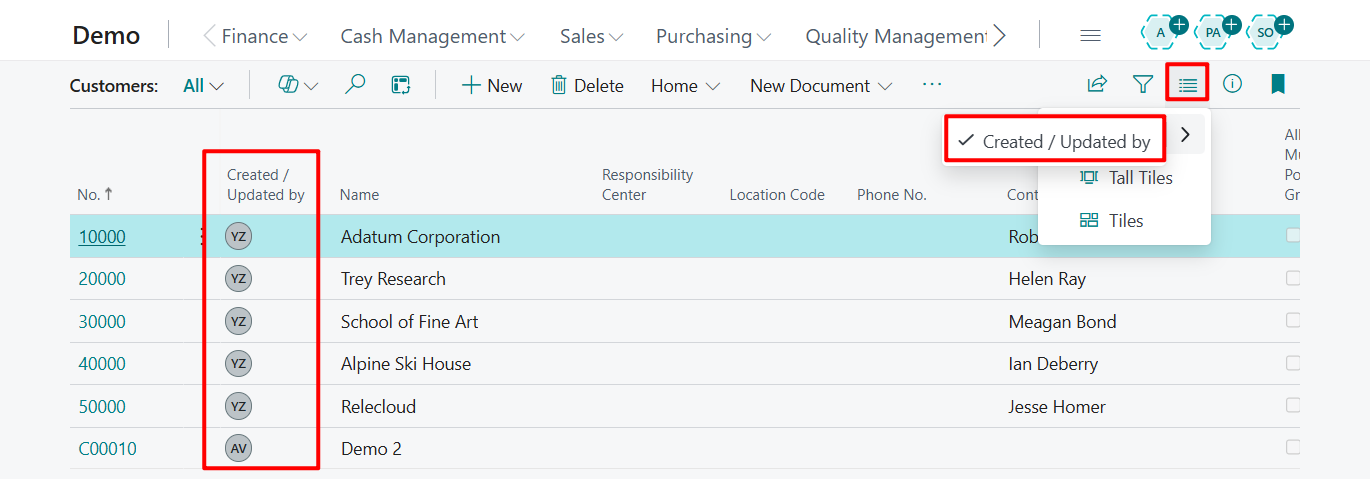
Business Central 2026 wave 1 (BC28) introduces visual avatars in list pages to display which user or agent created or modified records, eliminating the need for customization to show creator and modifier identity information.
 post Dynamics 365 Lab
"Users can hover over the avatar to see a tooltip with the full display name and record update timestamp (if available)."
Key points
- Avatars appear in list view layouts without requiring page customization, indicating record creators and modifiers
- Feature supports named users, system users, and AI agents following BC’s existing identity model
- Hovering over avatars shows tooltip with full display name and record timestamp
- Users can toggle the Created/Updated by column on or off via view layout options
- Benefits teams working with shared data by reducing verification time for ownership and responsibility
Quotes
- “Users can hover over the avatar to see a tooltip with the full display name and record update timestamp (if available).” (Shows how users can quickly access detailed information without opening the record, improving efficiency)
AL objects mentioned
As named in the post. A name that matches one object page by exact type and name links to it; the others stay as named.
- other “SystemCreatedBy”
- other “SystemModifiedBy”
- other “SystemCreatedAt”
- other “SystemModifiedAt”
Context
- Features: Avatars for record creators and modifiers, Data audit fields display, View layout options, Tooltip with display name and timestamp, AI agent identification, Excel export exclusion
- Versions: BC28, Business Central 2026 release wave 1, Business Central 2026 release wave 2
Source: Dynamics 365 Lab - Yun Zhu, community blog. Summary, key points and quotes are derived (CONTENT-NOTICE.md); read the original for the full text.