Business Central 2026 release wave 1 (BC28): Manage database index usage and cost per company (View index and Turn off indexes)
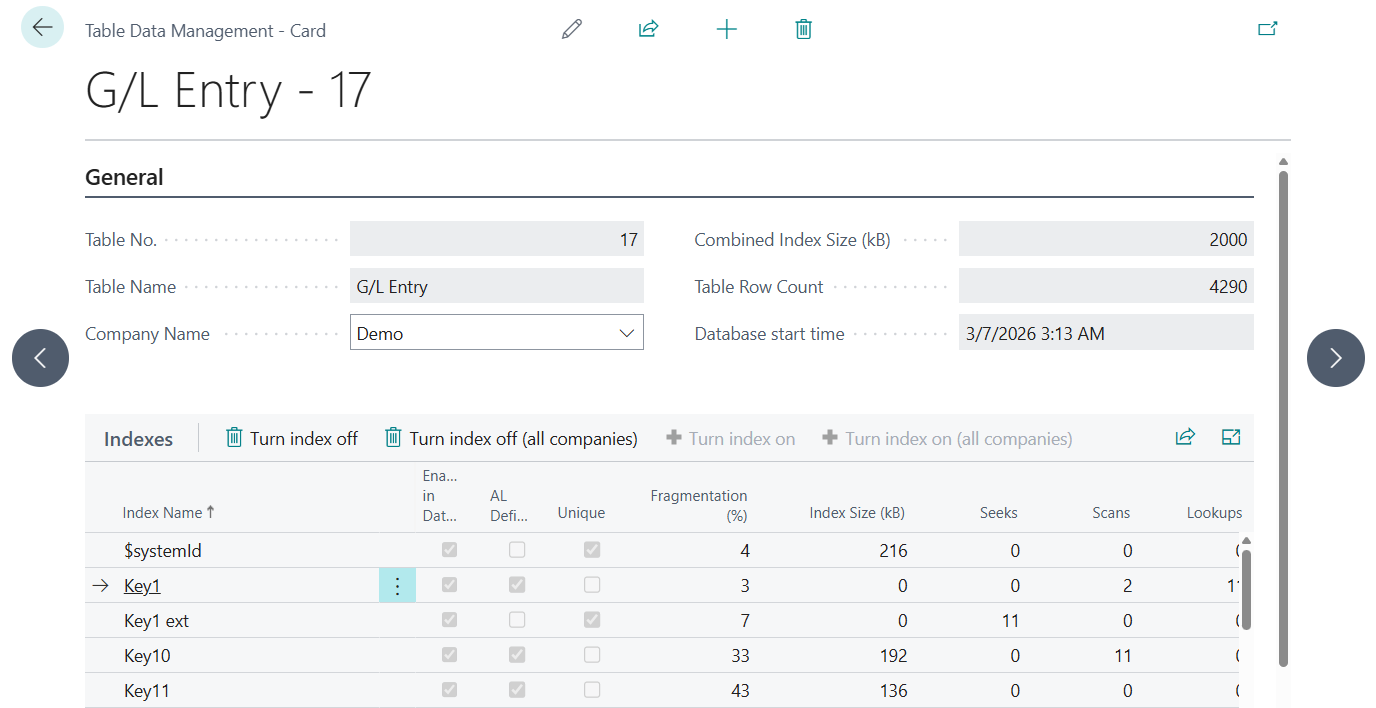
Business Central 2026 wave 1 introduces the ability to view database index details in the UI and selectively disable non-unique indexes per company to reduce storage costs and improve write performance. This feature helps administrators and developers optimize database usage directly from the Database Index Information page.
 post Dynamics 365 Lab
"You can turn off non-unique indexes with low usage to reduce storage costs and improve write performance."
Key points
- The new Database Index Information page shows per-index details including storage usage, SQL Server statistics, and index type
- Non-unique indexes with low usage can be disabled per company to reduce storage costs and improve write performance
- Unique indexes, primary keys, SIFT, and systemid indexes are protected from disabling
- Disabling an index takes effect immediately while enabling is queued for the next scheduled midnight maintenance process
Quotes
- “You can turn off non-unique indexes with low usage to reduce storage costs and improve write performance.” (This is the core capability that helps organizations optimize their database resources by selectively disabling underutilized indexes.)
- “Unique indexes, primary keys, SIFT, and systemid indexes are protected from disabling.” (This explains important guardrails that prevent accidental disabling of critical indexes that maintain data integrity.)
- “Disabling an index takes effect immediately. Enabling an index is queued for the next scheduled midnight process.” (Understanding the timing differences between disabling and enabling indexes is crucial for operational planning.)
AL objects mentioned
As named in the post. A name that matches one object page by exact type and name links to it; the others stay as named.
- table “Database Index”
- page 8700 “Table Information”
- page “Database Index Information”
- page “Table Data Management”
- page 9520 “Database Wait Statistics”
- page 9521 “Database Missing Indexes”
Not found in BC28-30: table “Database Index”, page “Database Index Information”, page “Table Data Management”.
Possibly related
No source states these links: they share an object, a model read them, or a person found the same subject.
- Business Central 2026 release wave 1 (BC28): Audit user and group permissions across apps (new Permissions Overview page) — possibly related: both name Page 8700 “Table Information”
- Business Central 2026 release wave 2 (BC29): Administrators can turn SIFT (SumIndexField Technology) indexes on/off — possibly related: both name Page 8700 “Table Information”
- Business Central 2026 release wave 2 (BC29): AL developers can turn indexes on/off in AL code — possibly related: both name Page 9521 “Database Missing Indexes”
- Business Central: Turn SIFT Indexes on or Off — possibly related: both name Page 8700 “Table Information”
- Database Wait Statistics in Business Central — possibly related: names Page 9520 “Database Wait Statistics”
- Dynamics 365 Business Central Online Wait Statistics in Telemetry: the AI boost — possibly related: both name Page 9520 “Database Wait Statistics”
- Dynamics 365 Business Central: understanding the Database Wait Statistics page. — possibly related: both name Page 9520 “Database Wait Statistics”
- Microsoft presents: Index management — possibly related: both name Page 8700 “Table Information”
- Missing indexes in Business Central databases — possibly related: names Page 9521 “Database Missing Indexes”
- Quick Tip: Reading the Capacity Page in the Business Central Admin Center — possibly related: both name Page 8700 “Table Information”
Context
- Features: View index information, Database index details UI, Turn off indexes per company, Index storage usage display, SQL Server index usage statistics, Index type classification
- Versions: 2026 release wave 1, BC28, 28.0 public preview, BC20
Source: Dynamics 365 Lab - Yun Zhu, community blog. Summary, key points and quotes are derived (CONTENT-NOTICE.md); read the original for the full text.