Business Central 2026 release wave 1 (BC28): New Early Access Preview Features page (1965, List)
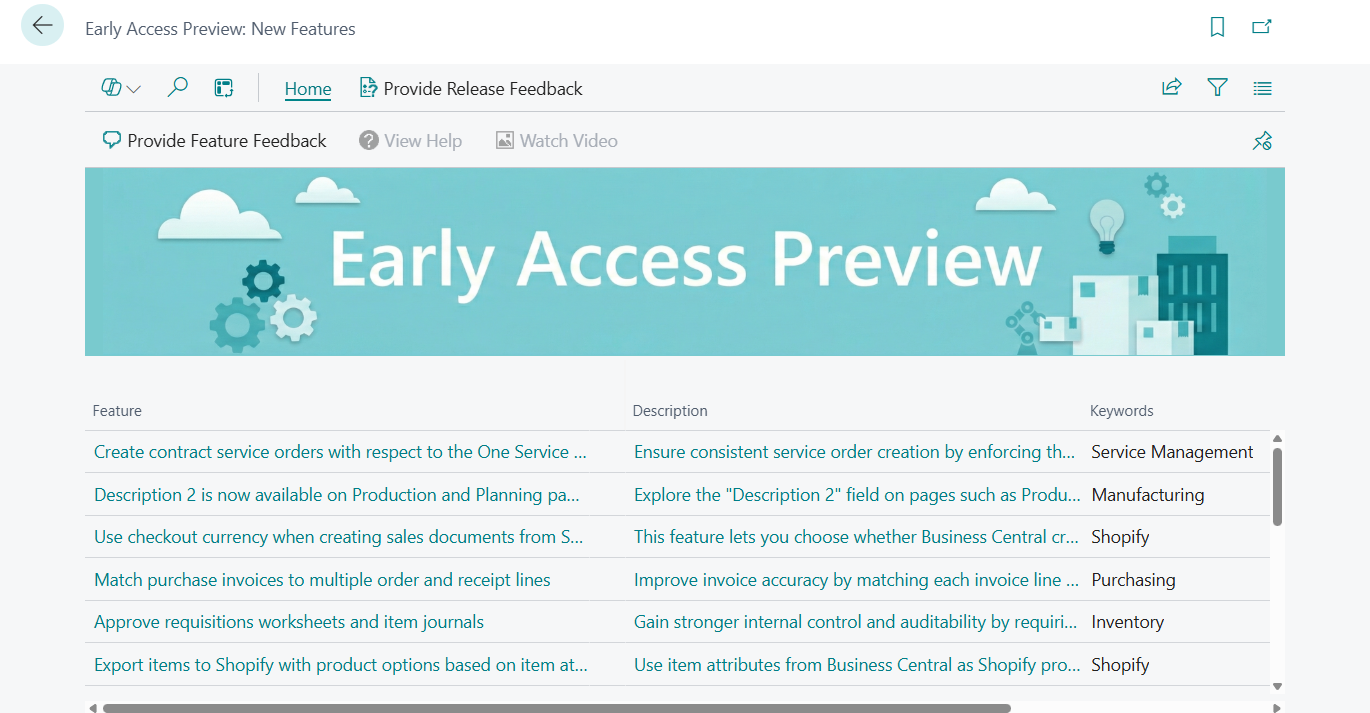
BC28 (2026 release wave 1) adds a new list page, Early Access Preview: New Features (page 1965), which shows some of the new features in the wave with detailed descriptions. From this page users can send feedback on a selected feature, and screenshots, screen recordings and file attachments can now be added. The page also has View Help and Watch Video actions. Optional features are still enabled on the Feature Management page.
 post Dynamics 365 Lab
Key points
- New optional features are initially disabled and can be individually enabled by administrators on the Feature Management page
- The Early Access Preview Features page (1965) lists new features for BC28 with detailed descriptions accessible via the Description field
- Users can provide feedback directly from the page with compliments, problem reports, or suggestions, now supporting screenshots, screen recordings, and file attachments
- The page includes View Help and Watch Video actions to assist users until official documentation becomes available
AL objects mentioned
As named in the post. A name that matches one object page by exact type and name links to it; the others stay as named.
- page “Early Access Preview: New Features”
- page 2610 “Feature Management”
Not found in BC28-30: page “Early Access Preview: New Features”.
Possibly related
No source states these links: they share an object, a model read them, or a person found the same subject.
- Business Central 2025 wave 1 (BC26): Edit price lists in Excel (New sales pricing experience) — possibly related: both name Page 2610 “Feature Management”
- Business Central 2025 wave 2 (BC27): Tenant administrators can set Feature Management switches with an API (page 30092 “APIV2 – Feature Management”) — possibly related: both name Page 2610 “Feature Management”
- Dynamics GP to Business Central – The Arrival of Smartlist Features via “Add Fields from Related Tables in Analysis Mode” — possibly related: both name Page 2610 “Feature Management”
Context
- Features: Early Access Preview Features page, Feature Management, Optional feature enablement, Feedback with screenshots, Screen recording capture, File attachments in feedback, View Help action, Watch Video action
- Versions: BC28, 2026 release wave 1
Source: Dynamics 365 Lab - Yun Zhu, community blog. Summary, key points and quotes are derived (CONTENT-NOTICE.md); read the original for the full text.