Business Central 2026 release wave 1 (BC28): Get item insights with advanced KPIs and Summary (new Item Statistics page)
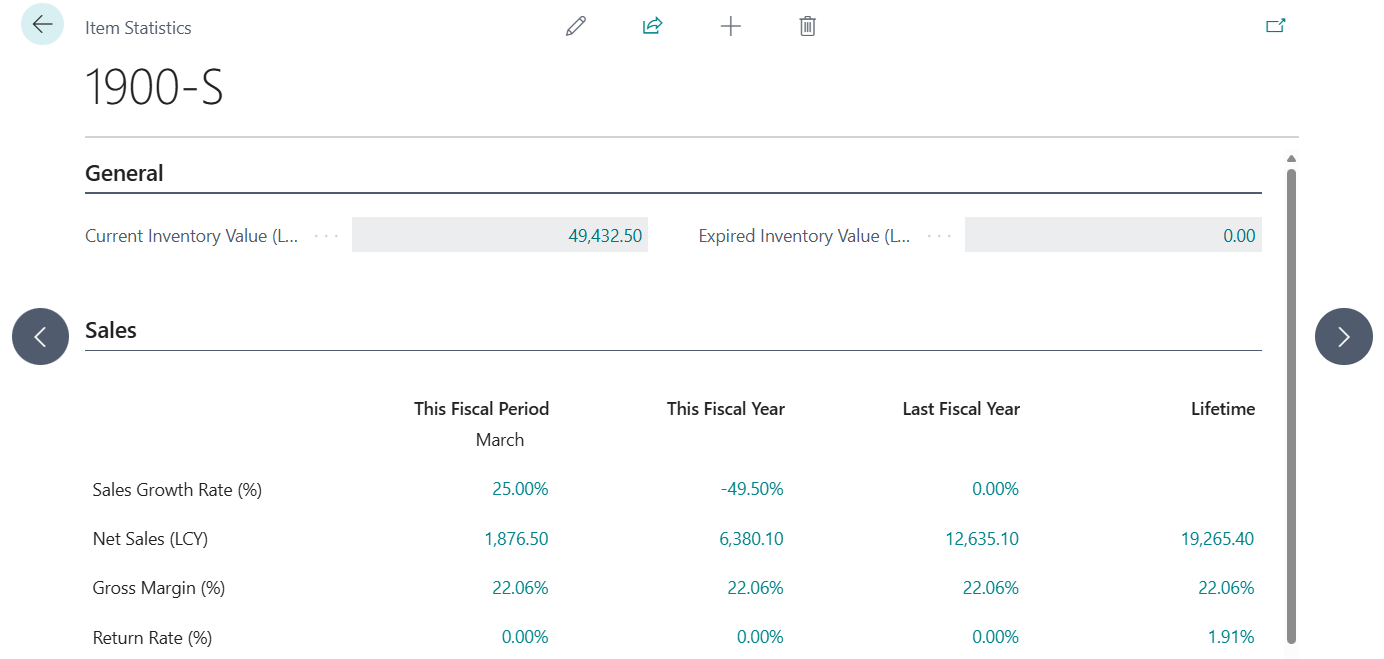
Business Central 2026 wave 1 introduces a new Item Statistics page that provides financial and performance metrics for items, including inventory values, sales growth rates, gross margins, and return rates across multiple time periods. Copilot can summarize these insights automatically when enabled.
 post Dynamics 365 Lab
"Copilot gives you faster and more comprehensive item summaries with new KPIs and data points from the new Item Statistics page."
Key points
- The Item Statistics page displays financial metrics like current inventory value, expired inventory value, and sales-related KPIs
- Four time periods are available for analysis: current fiscal period, current fiscal year, last fiscal year, and lifetime
- Sales metrics include growth rate, net sales, gross margin percentage, and return rate to track demand and profitability
- The page is accessible from the Item Card through Related > Statistics > Item Statistics or by searching Tell Me
- Enabling Summarize with Copilot automatically activates Copilot-powered item summaries with advanced KPIs
Quotes
- “Copilot gives you faster and more comprehensive item summaries with new KPIs and data points from the new Item Statistics page.” (Explains the main benefit of Copilot integration with the new Item Statistics page for accelerated insights)
- “The Item Statistics page provides financial and performance metrics for an item across different time periods.” (Defines the core purpose of the new page for analyzing items with multiple time horizons)
- “When you turn on the Summarize with Copilot capability, you automatically enable these enhancements.” (Clarifies how to activate the Copilot-powered summaries for item insights)
AL objects mentioned
As named in the post. A name that matches one object page by exact type and name links to it; the others stay as named.
Possibly related
No source states these links: they share an object, a model read them, or a person found the same subject.
- Allow Over Receipts of Products — possibly related: both name Page 30 “Item Card”
- Business Central 2025 wave 2 (BC27): Add more fields and columns by personalizing pages — possibly related: both name Page 30 “Item Card”
- Business Central 2026 release wave 1 (BC28): Calculate excise taxes — possibly related: both name Page 30 “Item Card”
- Business Central 2026 release wave 1 (BC28): Calculate withholding taxes for vendors (Withholding Tax) — possibly related: both name Page 30 “Item Card”
- Business Central 2026 release wave 1 (BC28): Define item attributes for item variants — possibly related: both name Page 30 “Item Card”
- Business Central 2026 Release Wave 1: A Mix of Platform Evolution and Practical Improvements — possibly related: both name Page 5827 “Item Statistics”
- Define Item Attributes for Item Variants — possibly related: both name Page 30 “Item Card”
- Directions EMEA 2023 Keynote: Business Central saves time for consultants and power users — possibly related: both name Page 30 “Item Card”
- Dynamics 365 Business Central – Some Considerations when Changing Standard Cost on an Item Card — possibly related: both name Page 30 “Item Card”
- Dynamics 365 Business Central: Automatically add extended text for items, general ledger accounts, and resources (Automatic Ext. Texts) — possibly related: both name Page 30 “Item Card”
Context
- Features: Item Statistics page, Advanced KPIs, Current Inventory Value tracking, Expired Inventory Value identification, Sales Growth Rate calculation, Gross Margin analysis, Return Rate monitoring, Summarize with Copilot
- Versions: BC28, 2026 release wave 1
Source: Dynamics 365 Lab - Yun Zhu, community blog. Summary, key points and quotes are derived (CONTENT-NOTICE.md); read the original for the full text.