Dynamics 365 Business Central: How to add Marketing Text Factbox to Item List page
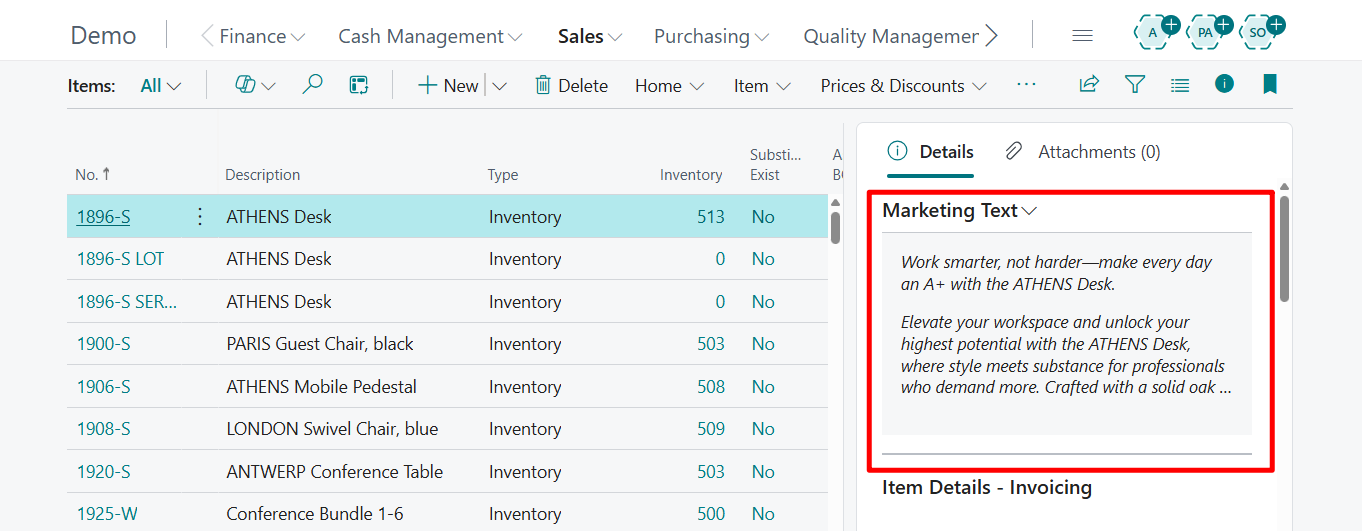
Adding a Marketing Text factbox to the Item List page requires a page extension that inserts the Entity Text Factbox Part and controls visibility using the Marketing Text codeunit. This customization lets users view AI-generated or custom marketing text directly from the list instead of only from the item card.
 post Dynamics 365 Lab
Key points
- Marketing text differs from the Description field; it serves as rich promotional copy for web shops and customer communications
- The Entity Text Factbox Part (page 2011) can be added to any list or worksheet containing Item No. using a page extension
- Visibility is controlled via the Marketing Text codeunit’s IsMarketingTextVisible method
- SetContext procedure must be called in OnAfterGetCurrRecord to populate the factbox with the correct item’s marketing text
- AI-generated marketing text suggestions are available through Copilot as the easiest creation method
AL objects mentioned
As named in the post. A name that matches one object page by exact type and name links to it; the others stay as named.
- page 2011 “Entity Text Factbox Part”
- page 31 “Item List”
- page 30 “Item Card”
- codeunit 5825 “Marketing Text”
Possibly related
No source states these links: they share an object, a model read them, or a person found the same subject.
- 20260713 - From Zero to Agent Building agents in Business Central — possibly related: both name Page 31 “Item List”
- Allow Over Receipts of Products — possibly related: both name Page 30 “Item Card”
- Business Central 2025 wave 2 (BC27): Add more fields and columns by personalizing pages — possibly related: both name Page 30 “Item Card”
- Business Central 2026 release wave 1 (BC28): Calculate excise taxes — possibly related: both name Page 30 “Item Card”
- Business Central 2026 release wave 1 (BC28): Calculate withholding taxes for vendors (Withholding Tax) — possibly related: both name Page 30 “Item Card”
- Business Central 2026 release wave 1 (BC28): Define item attributes for item variants — possibly related: both name Page 31 “Item List”
- Business Central 2026 release wave 1 (BC28): Get item insights with advanced KPIs and Summary (new Item Statistics page) — possibly related: both name Page 30 “Item Card”
- Define Item Attributes for Item Variants — possibly related: both name Page 30 “Item Card”
- Deploy Analysis Views with AL Code in Business Central 2026 Wave 1 (No Manual Setup) — possibly related: both name Page 31 “Item List”
- Directions EMEA 2023 Keynote: Business Central saves time for consultants and power users — possibly related: both name Page 30 “Item Card”
Context
- Features: Marketing Text, Entity Text Factbox, AI-generated product descriptions, Copilot, Page extensions
- Versions: 2024 release wave 1
Source: Dynamics 365 Lab - Yun Zhu, community blog. Summary, key points and quotes are derived (CONTENT-NOTICE.md); read the original for the full text.