Dynamics 365 Business Central: How to run a Report in Preview Mode without the Request Page (Hide Request Page)
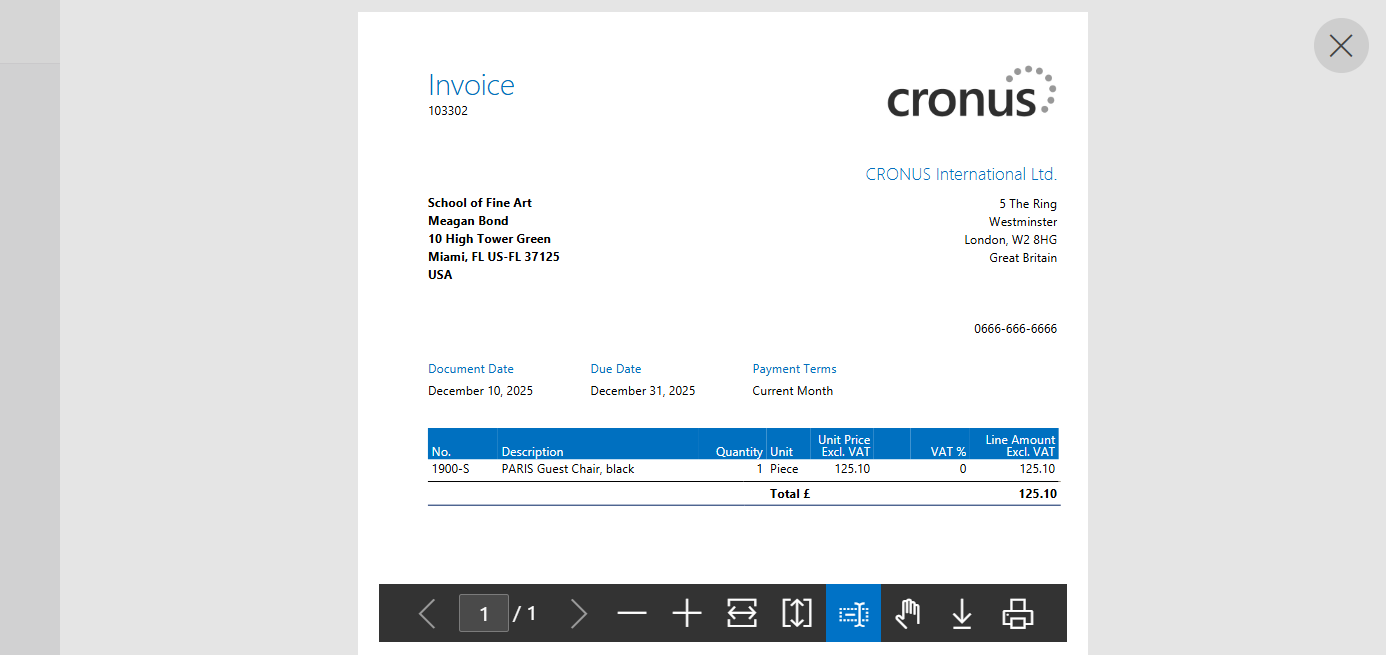
This post explains how to preview a Business Central report without showing the request page. It describes bypassing the request page using UseRequestPage or Report.Run methods, then demonstrates a preferred approach for BC26 that saves reports as PDF and displays them directly in the web client.
 post Dynamics 365 Lab
"However, doing so disables the preview and print options, causing the file to be downloaded directly."
Key points
- UseRequestPage(false) and Report.Run with RequestWindow=false bypass the request page but disable preview/print options and download the file instead
- Business Central 2025 Wave 1 (BC26) enables direct PDF preview in the web client, providing a better user experience
- Two practical approaches are provided: using Report Selections for standard reports and direct SaveAs method for fixed reports
- Reports can be saved as PDF using SaveReportAsPDFInTempBlob or SaveAs methods, then displayed with File.ViewFromStream
Quotes
- “However, doing so disables the preview and print options, causing the file to be downloaded directly.” (Explains the limitation of traditional methods for bypassing the request page, motivating the need for an alternative approach)
- “With this feature, you can open PDF attachments directly in the Business Central web client without downloading them first.” (Describes the BC26 capability that enables the improved solution for previewing reports without request pages)
AL objects mentioned
As named in the post. A name that matches one object page by exact type and name links to it; the others stay as named.
- report 1306 “Standard Sales - Invoice”
- report 6628 “Lot No Label”
- page 143 “Posted Sales Invoices”
- page 6508 “Lot No. Information List”
- table 112 “Sales Invoice Header”
- table 77 “Report Selections”
- table 6505 “Lot No. Information”
Possibly related
No source states these links: they share an object, a model read them, or a person found the same subject.
- 🧩 Deriving dimensions in Business Central beyond Default Dimensions — possibly related: both name Table 112 “Sales Invoice Header”
- BC 29 lets a single index span base table and table extension fields — possibly related: both name Table 112 “Sales Invoice Header”
- BC Friday Tips #56 Understand Missing Fields in Copy Documents — possibly related: both name Table 112 “Sales Invoice Header”
- BC Friday Tips #74 Copy Document and Custom Field — possibly related: both name Table 112 “Sales Invoice Header”
- Composite Layouts in Business Central 29.0: Brand One Report End to End — possibly related: both name Report 1306 “Standard Sales - Invoice”
- D365 Business Central: How to Fix Missing Sales Invoices in the API — possibly related: both name Table 112 “Sales Invoice Header”
- Dynamics 365 Business Central: “Hide Company Bank Account” setup in General Ledger Setup (Update Company Bank Account on posted documents) — possibly related: both name Table 112 “Sales Invoice Header”
- Dynamics 365 Business Central: Add a Scan Barcode action and scan multiple/Continious scanning (Invoke barcode scanning programmatically from AL) — possibly related: both name Table 6505 “Lot No. Information”
- Dynamics 365 Business Central: Displaying Sales/Purchase Order No. in Item Ledger Entries (Source Order No. and Source Description) — possibly related: both name Table 112 “Sales Invoice Header”
- Dynamics 365 Business Central: How to change Due Date of posted documents — possibly related: both name Page 143 “Posted Sales Invoices”
Heads up
- gotcha: “Doing so disables the preview and print options, causing the file to be downloaded directly.” (about report Standard Sales - Invoice)
- preview-disclaimer: “You must be on Business Central 2025 Release Wave 1 (BC26) or later.” (about version BC26, version 2025 Release Wave 1)
Context
- Features: Request Page Bypass, PDF Preview in Web Client, Report Selections, SaveReportAsPDFInTempBlob, File.ViewFromStream, Page Extensions
- Versions: BC26, Business Central 2025 Wave 1
Source: Dynamics 365 Lab - Yun Zhu, community blog. Summary, key points and quotes are derived (CONTENT-NOTICE.md); read the original for the full text.