Business Central 2026 release wave 1 (BC28): Allow Posting From/To DateFormula (A new way to specify posting periods)
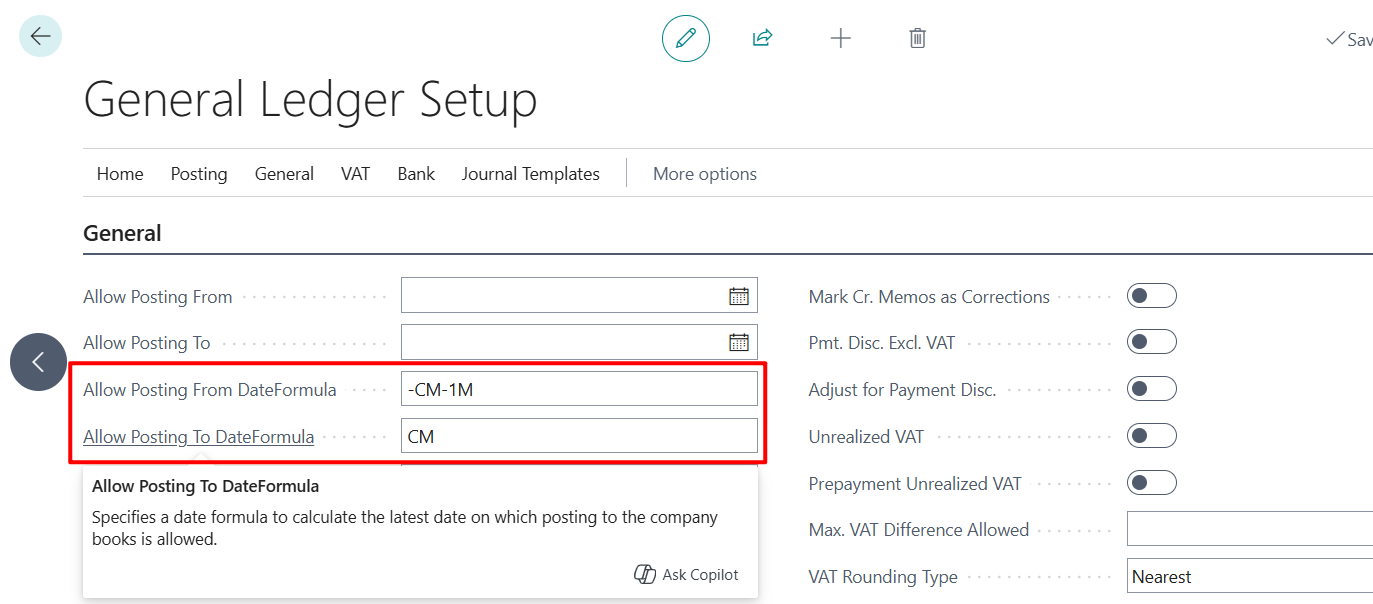
Business Central 2026 wave 1 introduces Allow Posting From/To DateFormula fields that let you define posting periods using dynamic date formulas (like 'CM' for current month) instead of manually updating fixed dates. This replaces the need for constant manual updates to posting date restrictions.
 post Dynamics 365 Lab
"This formula is calculated based on the 'Work Date' from My Settings, not the system's 'Today' date."
Key points
- DateFormula fields calculate posting boundaries relative to the work date, eliminating manual date maintenance each period
- Formulas support relative date expressions combining letters (C, D, W, M, Q, Y) and numbers (e.g., ‘CM+1M’ for current month plus one month)
- The feature applies to both General Ledger Setup and User Setup, allowing company-wide and user-specific posting period rules
- The two methods are mutually exclusive per field, but you can mix static dates and formulas across different fields for flexible control
Quotes
- “This formula is calculated based on the ‘Work Date’ from My Settings, not the system’s ‘Today’ date.” (Critical implementation detail ensuring consistency with existing posting period behavior and preventing date mismatches.)
AL objects mentioned
As named in the post. A name that matches one object page by exact type and name links to it; the others stay as named.
Possibly related
No source states these links: they share an object, a model read them, or a person found the same subject.
- BC Friday Tips #51 Dimension No. in Dimension Value — possibly related: both name Page 118 “General Ledger Setup”
- Become More Efficient With Background Posting — possibly related: both name Page 118 “General Ledger Setup”
- Business Central 2026 release wave 1 (BC28): Show Currency Symbol/Code and Currency Symbol Position — possibly related: both name Page 118 “General Ledger Setup”
- Comparing Segment and Dimension Setup between Dynamics GP and Dynamics Business Central (2024) — possibly related: both name Page 118 “General Ledger Setup”
- Control Deferral Posting — possibly related: both name Page 119 “User Setup”
- Control When People Can Post to the General Ledger — possibly related: both name Page 118 “General Ledger Setup”
- Dynamics 365 Business Central – Why isn’t Payment Tolerance being taken automatically in the Cash Receipt Journal? — possibly related: both name Page 118 “General Ledger Setup”
- Ensure Consistency in Journals With Journal Check — possibly related: both name Page 118 “General Ledger Setup”
- Safeguard G/L Accounts From Deletion — possibly related: both name Page 118 “General Ledger Setup”
- Set Up Your Local Currency (2024) — possibly related: both name Page 118 “General Ledger Setup”
Heads up
- gotcha: “This formula is calculated based on the ‘Work Date’ from My Settings, not the system’s ‘Today’ date.” (about table General Ledger Setup, version BC28)
Context
- Features: Allow Posting From DateFormula, Allow Posting To DateFormula, Dynamic posting period configuration, Relative date calculations, User-specific posting date ranges
- Versions: BC28, 2026 release wave 1
Source: Dynamics 365 Lab - Yun Zhu, community blog. Summary, key points and quotes are derived (CONTENT-NOTICE.md); read the original for the full text.